LMT E-Sports extends the Live Match Tracker for competitive gaming titles such as Counter-Strike, League of Legends, Dota 2 and Valorant. The same match.lmtPlus widget is used, but eligible matches are rendered through a Grid.gg embed (game-overview widget) instead of the regular LMT pitch and tabs. Only a small subset of regular LMT properties is supported for these matches.
Gaming titles only. This page covers competitive gaming integrations (Counter-Strike, League of Legends, Dota 2, Valorant) via the Grid.gg embed. E-League sports (e.g. e-soccer, e-basketball) are not covered here — configure them using the standard LMT documentation.
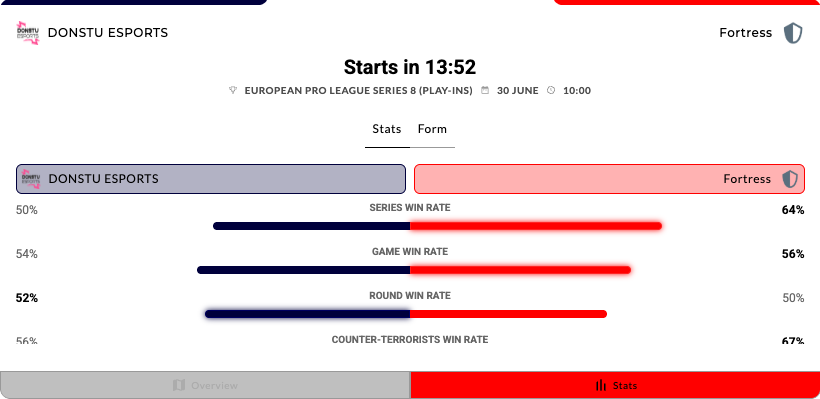
LMT E-Sports default view.
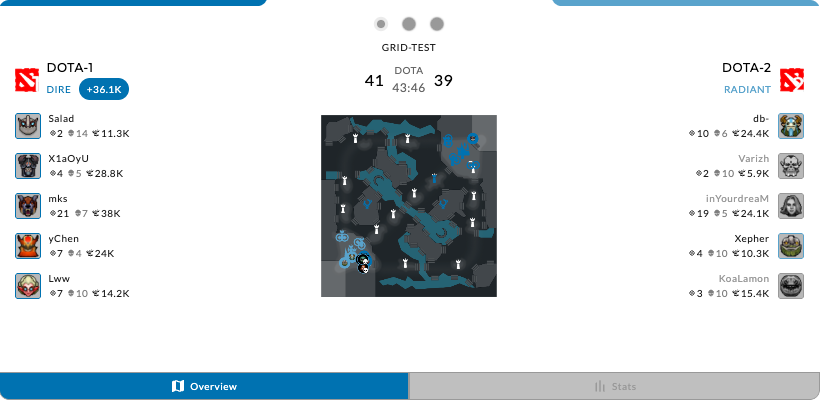
Follow the action on a minimap during live games.
See the LMT E-Sports widget demo.
#Supported Content and Environment
#Required Parameters
- widget-name:
match.lmtPlus - matchId or entityId: One identifier is required.
- matchId: Sportradar numeric match ID for a supported E-Sports sport (e.g.
12345678). - entityId: Grid-native match identifier in the form
grid:match:<id>(e.g.grid:match:123).
- matchId: Sportradar numeric match ID for a supported E-Sports sport (e.g.
When a Sportradar matchId is used, the widget resolves the match, confirms it belongs to a supported E-Sports sport, and maps it to the corresponding Grid series ID. When grid:match:<id> is used, the widget loads the Grid embed directly for that series.
Environment Requirements
Technical Requirements:
- JavaScript enabled
- XMLHttpRequest support for data fetching
- CSS3 support for styling and animations
Supported Sports
LMT E-Sports supports the following sports:
| Sport | Sport ID |
|---|---|
| Counter-Strike | 109 |
| League of Legends | 110 |
| Dota 2 | 111 |
| Valorant | 194 |
#Main Configurable Features
Illustrations of the main E-Sports views and relevant property values below.
Default Grid.gg game-overview embed with in-embed tab navigation.
#API Reference
The table below lists only properties that are passed into and used by the Grid wrapper (src/buildingblocks/lmtPlus/grid/). Standard Live Match Tracker properties such as scoreboard, momentum, tabs, layout, and pitch customisation are not used for E-Sports matches.
Properties not listed above (including scoreboard, tabsPosition, , , , pitch options, and LCP highlights props) are ignored when the Grid wrapper is active. Tab branding is limited to — see .
#Theming
Theming for the E-Sports widget is more limited than for the full LMT.
The Grid embed reads colours from the widget theme at runtime. Existing widget theming used for regular LMT applies the same font and colour rules to the E-Sports widget — no extra setup is needed beyond your standard LMT theme.
If you are setting up theming for the first time, follow the Styling Widgets guide to set up default theming, then apply E-Sports-specific overrides (if needed) as shown below.
Only font-family, background-color, and color values are forwarded to the Grid embed. Other properties should be left as-is.
/* MAIN BACKGROUND COLOR */
.sr-bb {
    background-color: #0f172a;
}

/* DEFAULT TEXT COLOR */
.sr-bb .srt-base-1 {
    color: #e2e8f0;
}

/* PRIMARY COLOR (team accents, buttons) */
.sr-bb .srt-primary-1 {
    background-color: #6366f1;
}

/* HOME TEAM COLOR */
The Grid wrapper maps srt-primary-1, srt-home-1, , , and the background colour into the Grid customer theme. Changing other classes will not affect the Grid embed appearance.
#Tabs Branding
The Grid embed includes its own tab navigation. Tab branding uses the same branding object as regular LMT — see the Customizing Widgets tutorial for the full schema — but for Grid content only branding.tabs.option is supported. That property is a subset of the standard tabs branding API; all other settings (align, variant, iconPosition, icons, arrowIcon, useClientTheming, and namespace-specific overrides) are ignored for E-Sports matches.
The tabs, tabsPosition, and activeTab widget properties (tab reordering and layout) are also ignored for E-Sports matches.
Displays both icon and text label on each tab.
#Streaming
Live video streaming is available for E-Sports matches when a valid jwt is provided and a stream is available for the match.
When streaming is enabled, the Grid game-overview embed shows a stream button. Clicking it opens a stream overlay with the standard LMT video player on top of the Grid content.
To enable streaming:
- Pass a
jwtprop with"av"scope. See JWT Authentication. - Ensure stream availability is not suppressed by
streamNotAvailableMessageorstreamNotAvailableBgImage.
Use the streaming-related properties in the table above to configure player behaviour (streamAutoplay, streamMuteVideo, and others).
#Integration Examples
#Property Name Transformations
Properties do not always transfer from the above table directly into integration code. Properties must be transformed differently for each integration method:
JavaScript/Programmatic Integration
- Property names remain unchanged in camelCase
- Properties become members of the 4th parameter object in
SIR()call - Example:
cardVariant: "compact"
In javascript integration, the properties go into an object which is passed as the 4th argument of the call ti SIR() function. Please see Global SIR API
HTML/Declarative Integration
- Convert camelCase to lowercase with dashes, e.g. cardVariant becomes card-variant
- Add
data-sr-prefix - Example:
cardVariant→data-sr-card-variant