Golf and Combat (MMA) are supported on Live Match Tracker (match.lmtPlus) through dedicated layouts. These variants use entityId instead of matchId and only support a subset of standard LMT properties.
For standard match-based integration, see LMT.
| Golf | Combat (MMA) | |
|---|---|---|
| Entity ID | sr:stage:<id> | sr:tournament:<id> |
| Demo | Open demo | Open demo |
| Streaming | Premium LMT feature | UFC events only |
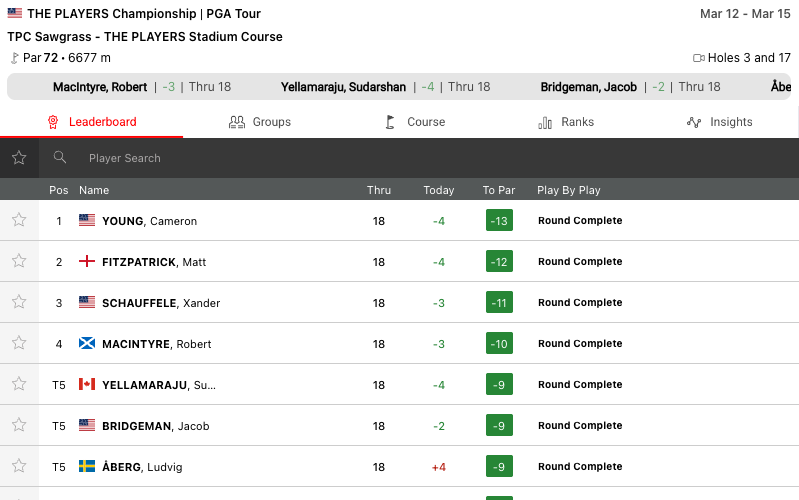
Default widget display
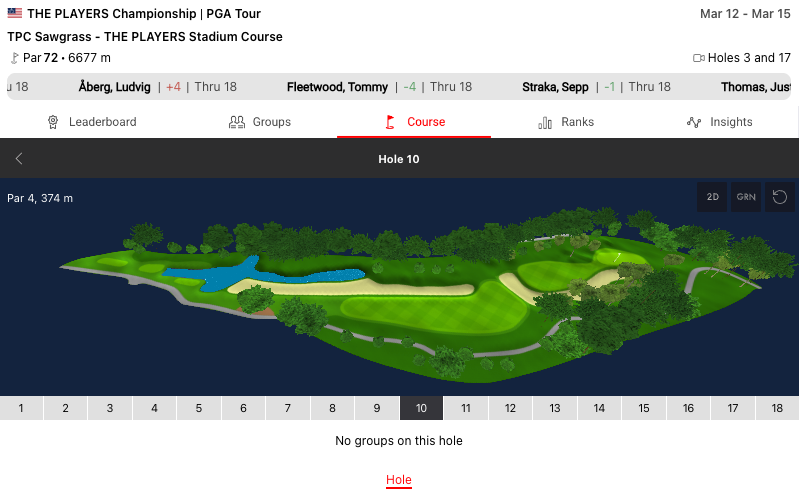
Golf Course Hole Overview
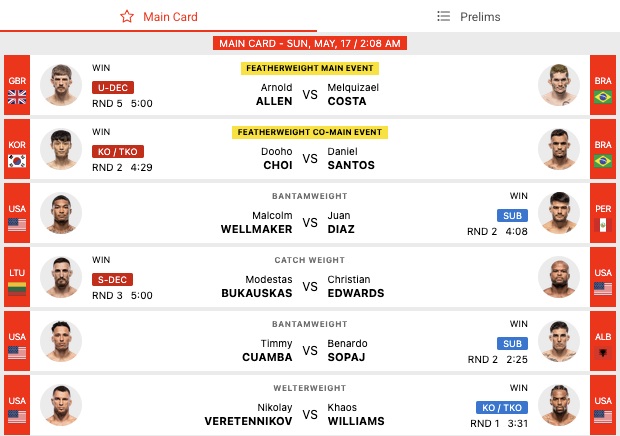
Default widget display
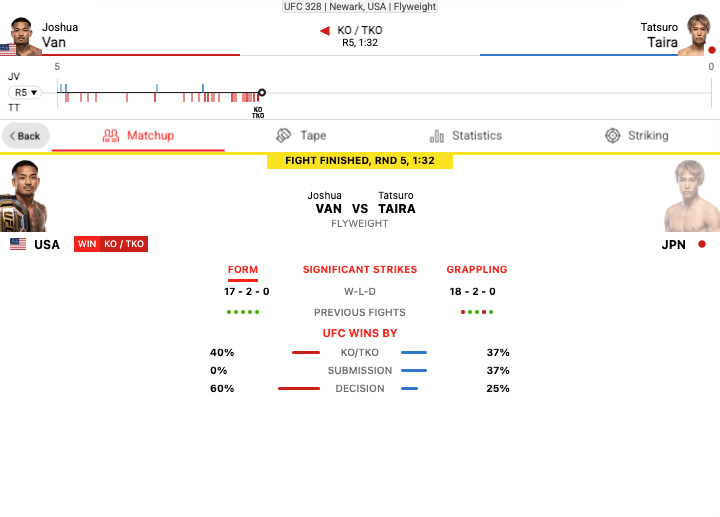
MMA Fight Detail View
match.lmtPlussr:stage:<id> or golf:stage:<id> for golf, sr:tournament:<id> or mma:event:<id> for combat (MMA). Use golf:stage / mma:event prefixes for IMGA IDs.Combat (MMA) Sportradar IDs: The same API-to-widget ID mapping described in and applies: use from your data source (for example ) and pass it as in (for example ).
Environment Requirements
Properties below apply to one or both variants as noted.
Theming is more limited than on standard LMT. Tab branding uses the same branding object as regular LMT — see Tabs Branding for display options (iconText, icon, text) and Customizing Widgets for the full schema. The main widget area only respects the CSS below. Existing global LMT theming (font, background-color) applies automatically — light/dark mode follows background-color.
New to widget styling? Start with Styling Widgets, then add sport-specific overrides. Only font-family, background-color, and color should be changed in these snippets.
When streaming is enabled, the streaming option is shown if the currently displayed hole (Golf) or currently selected fight (Combat) has streaming available. For Golf, when streams are available, the hole selection UI is also shown on the Live tab and at the top level of the Courses tab.
To enable streaming:
jwt prop with "av" scope. See JWT Authentication.streamToggle prop, e.g. onPitchButton.streamNotAvailableMessage or streamNotAvailableBgImage.Golf: streaming requires the Premium LMT license. When streams are available for the current hole, a stream control is shown and the hole selection UI appears on the Live tab and at the top level of the Courses tab.
Combat (MMA): streaming is available for UFC events only. When streams are available for the selected fight, a stream control is shown on the fight detail view.
Properties do not always transfer from the above table directly into integration code. Properties must be transformed differently for each integration method:
SIR() callcardVariant: "compact"In javascript integration, the properties go into an object which is passed as the 4th argument of the call ti SIR() function. Please see Global SIR API
data-sr- prefixcardVariant → data-sr-card-variantsimpleTournamentIdsr:simple_tournament:188770sr:tournament:<id>entityIdentityId: 'sr:tournament:188770'| Property | Golf | Combat | Type | Default | Description |
|---|---|---|---|---|---|
entityId | ✓ | ✓ | string | Required | Event identifier. Golf: sr:stage:<id> or golf:stage:<id>. Combat: sr:tournament:<id> or mma:event:<id> |
scoreboard | ✓ | ✓ | string | "compact" | "compact" or "disable" |
tabsPosition | ✓ | ✓ | string | "bottom" | "top", "bottom", or "disable" |
tabs | ✓ | ✓ | object | — | Per-sport tab order; see LMT Tabs identifiers |
branding | ✓ | ✓ | object | — | Tab appearance and customization via branding.tabs. See Tabs Branding on LMT and Customizing Widgets. |
momentum | — | ✓ | string | "compact" | "compact" or "disable" (combat only) |
pitchCustomBgColor | ✓ | — | string | — | Custom course background color (hex/rgb), e.g. "#1a5f3e" |
jwt | ✓ | ✓ | string | — | JWT authentication token for video streaming. Needs to have "av" within token scope. See JWT Authentication |
streamToggle | ✓ | ✓ | string | — | Video stream toggle mode.
|
activeStreamToggle | ✓ | ✓ | string | "tracker" | Initial view when stream toggle is enabled.
|
streamContentVariant | ✓ | ✓ | string | "standard" | Video stream variant.
|
disableAugmentedStream | ✓ | ✓ | boolean | false | When true, disables augmented stream option even if available |
streamNotAvailableMessage | ✓ | ✓ | string | boolean | — | Custom message to display when stream is unavailable. If true, shows default message. Video stream will not be loaded when this value is not empty. |
streamNotAvailableBgImage | ✓ | ✓ | string | — | Background image URL to display when stream is unavailable. Video stream will not be loaded when this value is not empty. |
streamAllowFullscreen | ✓ | ✓ | boolean | false | When true, enables fullscreen button on video player. Note: this is only applicable if current device is a mobile device. |
streamMuteVideo | ✓ | ✓ | boolean | false | When true, starts video stream with audio muted |
eventCentreConfig | ✓ | — | object | — | Additional golf options. Set units to "metric" or "imperial" for distance and related units (for example { "units":"imperial" }). |
/* MAIN BACKGROUND COLOR */
.sr-bb {
background-color: #fff;
}
/* DEFAULT TEXT COLOR */
.sr-bb .srt-base-1 {
color: #333;
}
/* PRIMARY TEXT COLOR */
.sr-bb .srt-base-1-primary {
color: red;
}
/* SURFACE BACKGROUND COLOR (golf only) */
.sr-bb .srt-golf-surface {
background-color: gray;
}Other srt-* classes have no effect on the golf widget main area.
SIR('addWidget', '#sr-widget', 'match.lmtPlus', {
entityId: 'sr:stage:12345',
jwt: 'your-jwt-token',
streamToggle: 'onPitchButton',
streamMuteVideo: true
});filters.sport.hidden → Complex objects must be passed as JSON stringsIn HTML integration, the properties go into the parent HTML object as object properties, prefixed with data-sr- as explained above.
This method supports only simple (base) properties and does not support properties that require functions.
In all examples replace sportradar in the widgetloader URL path with your clientId.
Example if your clientId is client1:
https://widgets.sir.sportradar.com/sportradar/widgetloaderhttps://widgets.sir.sportradar.com/client1/widgetloaderInitialize the widget programmatically using the JavaScript API. The widget renders in the specified container element.
(function(a,b,c,d,e,f,g,h,i){a[e]||(i=a[e]=function(){(a[e].q=a[e].q||[]).push(arguments)},i.l=1*new Date,i.o=f,
g=b.createElement(c),h=b.getElementsByTagName(c)[0],g.async=1,g.src=d,g.setAttribute("n",e),h.parentNode.insertBefore(g,h)
)})(window,document,"script","https://widgets.sir.sportradar.com/sportradar/widgetloader","SIR", {
language: 'en'
});
SIR('addWidget', '#sr-widget', 'match.lmtPlus', {
entityId: 'sr:stage:123'
});<div id="sr-widget"></div>Insert the following HTML code at the target widget location. Complex object properties must be passed as JSON-encoded strings.
<div id="sr-widget"
data-sr-widget="match.lmtPlus"
data-sr-entity-id="sr:stage:123">
</div>
<script type="application/javascript"
src="https://widgets.sir.sportradar.com/sportradar/widgetloader"
async>
</script>