User management is crucial for effective moderation. The system supports different roles with appropriate access levels to ensure the right people have the permissions they need while maintaining security and operational efficiency.
#User Roles Explained
- Supervisors: Full access to all brand operations, can manage all operators under a brand
- Moderators: Access to specific operators only, focused on day-to-day moderation tasks
- Guests: Read-only access for observation and reporting purposes
#Inviting Users
To begin the client setup, our team will invite the first supervisor. This supervisor will have the capability to invite all other supervisors and moderators.
#Inviting at Brand Level (Supervisors)
Supervisors have full access to all operations within a brand and can manage all operators under that brand.
#Inviting at Operator Level (Moderators)
Moderators have access limited to specific operators and focus on day-to-day moderation tasks.
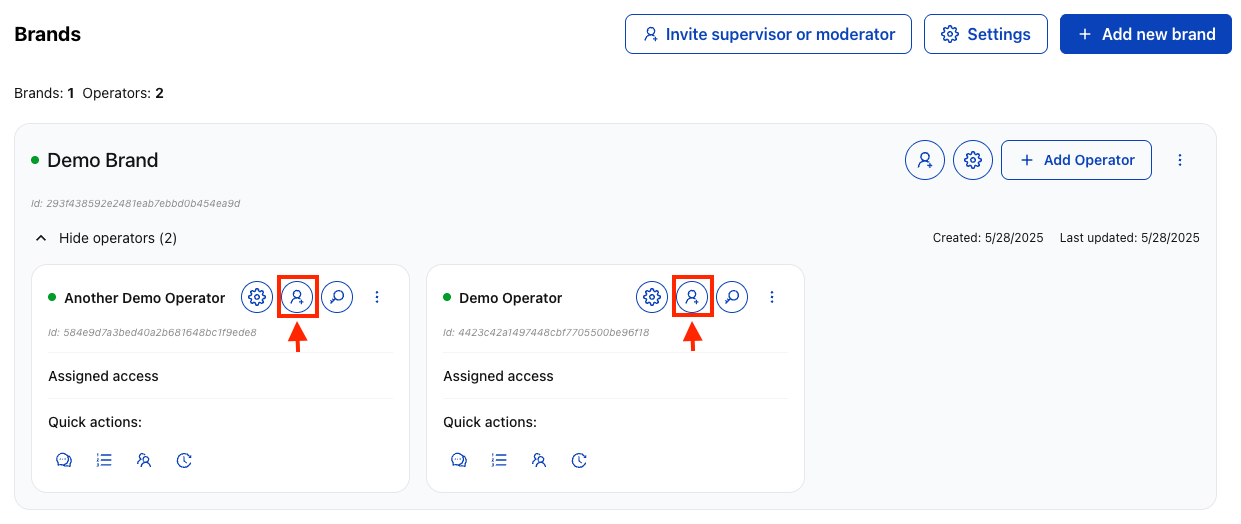
Expand the brand to show operators and click the invite button on the specific operator card to access operator-level user management.

Select "Moderator" role, enter the user's email address, and confirm the specific brand and operator selection. Click "Send Invitation".

The user receives a targeted invitation for the specific operator with access limited to that operator only.
See more about managing user roles in the management section.
#Account Setup Process
#For Invited Users
#Email Invitation
User receives an invitation email with a setup link containing role and access level information.
#Account Setup
Follow the link to complete account creation, set a password and security preferences, and accept terms and conditions.
#Initial Login
Access the moderation interface, review assigned permissions and access areas, and complete any required training or orientation.
#Role Assignment Strategy
- Brand-Level Supervisors: Assign for users who need oversight across multiple operators or brand-wide management capabilities
- Operator-Level Moderators: Assign for day-to-day operational staff who focus on specific markets, languages, or operator regions
- Guest Access: Provide for stakeholders who need visibility but not operational control
#User Management Best Practices
- Principle of Least Privilege: Give users only the minimum access required for their role
- Regular Audits: Periodically review user access and permissions
- Prompt Removal: Remove access immediately when users leave the organization
- Clear Identification: Use professional email addresses that clearly identify the user's role and organization
#Security Considerations
- Email Verification: All invitations require email verification before account activation
- Role Scoping: Moderator access is automatically limited to their assigned operators
- Audit Trail: All user invitations and role changes are logged for compliance
- Session Management: Users can be required to re-authenticate periodically
#Managing Existing Users
After invitation, supervisors can:
- View Active Users: See all supervisors and moderators across brands and operators
- Modify Permissions: Change user roles or reassign to different operators
- Deactivate Accounts: Temporarily or permanently remove user access
- Monitor Activity: Review user actions and moderation decisions
After inviting users, proceed to create and manage channels and configure moderation settings for your operators.

