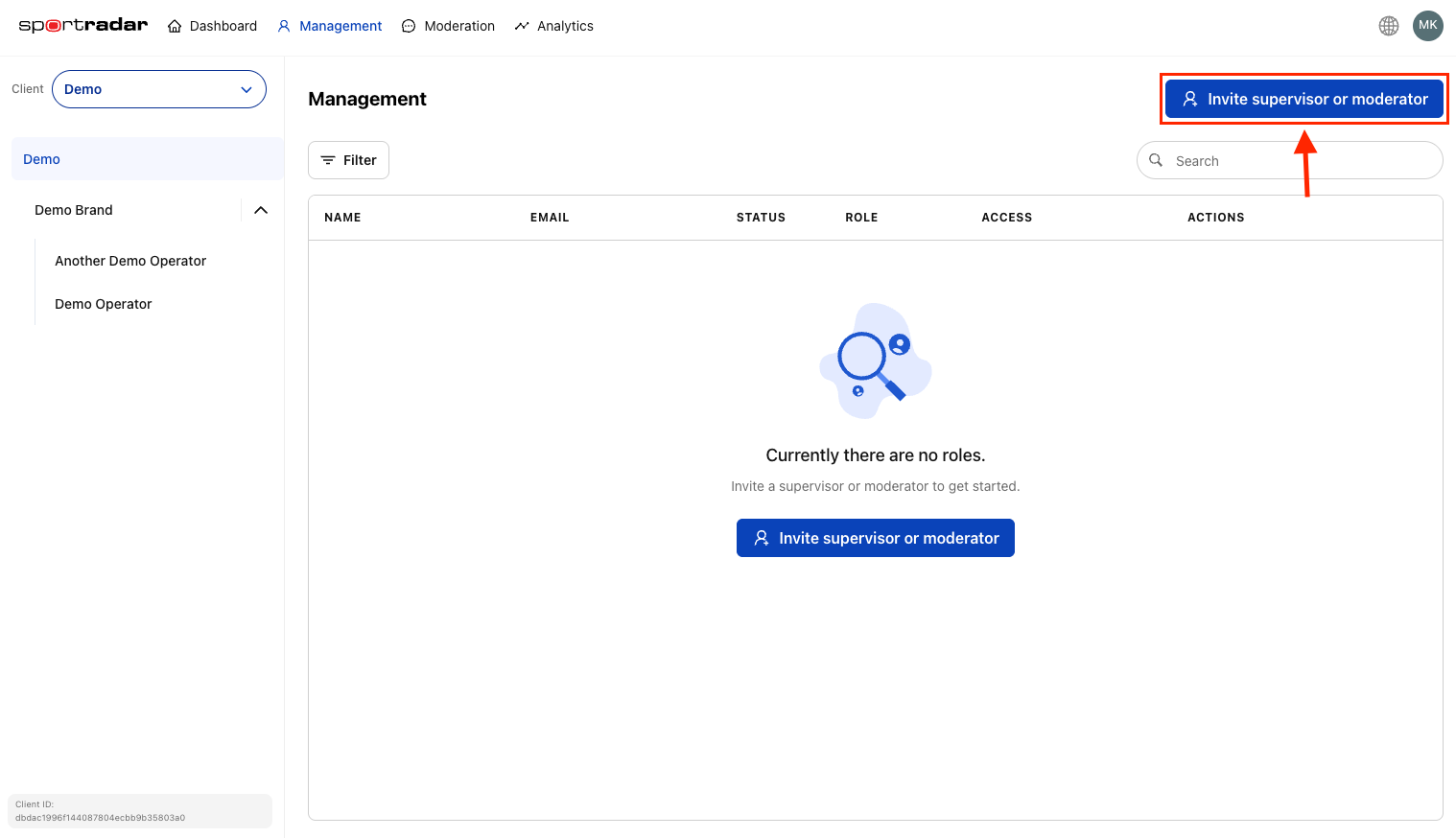
The Management section provides supervisors with comprehensive tools to oversee user roles, permissions, and access across all brands and operators. This centralized interface enables efficient user administration while maintaining proper security and role-based access control.
#User Roles and Permissions
Understanding the different user roles is essential for effective access management:
- Supervisors: Full access to all brand operations, can manage all operators under a brand, invite other users, and configure system settings
- Moderators: Access limited to specific operators, focused on day-to-day moderation tasks like reviewing messages and managing users
- Developers: Access limited to the Channels page under Moderation
- Guests: Read-only access for observation and reporting purposes
#Detailed Permissions Matrix
| Permission | Supervisor | Moderator | Developer |
|---|---|---|---|
| Access to the dashboard | 🚫 | 🚫 | 🚫 |
| Access to Management | ✅ | 🚫 | 🚫 |
| Create Client | 🚫 | 🚫 | 🚫 |
| Create Brand | ✅ | 🚫 | 🚫 |
| Create Operator | ✅ | 🚫 | 🚫 |
| Edit Client/Brand/Operator settings | ✅ | 🚫 | 🚫 |
| Add API Keys | ✅ | 🚫 | 🚫 |
| Disable API Keys | ✅ | 🚫 | 🚫 |
| Access to settings | ✅ | 🚫 | 🚫 |
| Client settings | 🚫 | 🚫 | 🚫 |
| Brand settings | ✅ | 🚫 | 🚫 |
| Operator settings | ✅ | 🚫 | 🚫 |
| Set spamming parameters / Set user prompt | ✅ | 🚫 | 🚫 |
| Blacklisted words settings | ✅ | 🚫 | 🚫 |
| Message length settings | ✅ | 🚫 | 🚫 |
| Autopilot settings | ✅ | 🚫 | 🚫 |
| Assisted moderation settings | ✅ | 🚫 | 🚫 |
| User sanctioning | ✅ | 🚫 | 🚫 |
| Reactions settings | ✅ | 🚫 | 🚫 |
| Flash Bet Timers | 🚫 | 🚫 | 🚫 |
| Dashboard user list | ✅ | 🚫 | 🚫 |
| Invite new moderator | ✅ | 🚫 | 🚫 |
| Invite new supervisor | ✅ | 🚫 | 🚫 |
| Change user role | ✅ | 🚫 | 🚫 |
| Remove user | ✅ | 🚫 | 🚫 |
| Enable/disable user | ✅ | 🚫 | 🚫 |
| Assign to operator | ✅ | 🚫 | 🚫 |
| Active moderators | ✅ | 🚫 | 🚫 |
| Access to the review stream page | ✅ | ✅ | 🚫 |
| Select an operator | ✅ | ✅ | 🚫 |
| Enable/disable autopilot | ✅ | ✅ | 🚫 |
| Enable/disable autopilot per operator | ✅ | ✅ | 🚫 |
| Enable/disable assisted moderation | ✅ | ✅ | 🚫 |
| Change assisted moderation parameters | ✅ | ✅ | 🚫 |
| Accept report | ✅ | ✅ | 🚫 |
| Reject report | ✅ | ✅ | 🚫 |
| View message context | ✅ | ✅ | 🚫 |
| Sort review stream messages | ✅ | ✅ | 🚫 |
| Toggle reported messages only visibility | ✅ | ✅ | 🚫 |
| Panic button | ✅ | ✅ | 🚫 |
| Check in as a moderator | ✅ | ✅ | 🚫 |
| View active moderators | ✅ | ✅ | 🚫 |
| Access the chat user list page | ✅ | ✅ | 🚫 |
| Un-ban users | ✅ | ✅ | 🚫 |
| Permanently ban a user | ✅ | ✅ | 🚫 |
| Search users | ✅ | ✅ | 🚫 |
| Create channel | ✅ | 🚫 | ✅ |
| Delete channel | ✅ | 🚫 | ✅ |
| Edit channel settings | ✅ | 🚫 | ✅ |
| View channel | ✅ | ✅ | ✅ |
| Search channel | ✅ | ✅ | ✅ |
| Access the analytics page | ✅ | ✅ | 🚫 |
| Access the archive | ✅ | ✅ | 🚫 |
#Adding New Users
The Management section provides a centralized location for inviting new users across your entire organization.
#Managing Existing Users
#Viewing All Users
The Management section displays a comprehensive list of all users across your organization, showing their roles, associated brands/operators, and current status.
#Modifying User Access
To update an existing user's permissions or assignment:
#Alternative Invitation Methods
Users can also be invited directly from the Dashboard view:
Brand-Level Invitations (for Supervisors):

- Navigate to Dashboard
- Click the invite icon on any brand card
- Complete the supervisor invitation process
Operator-Level Invitations (for Moderators):
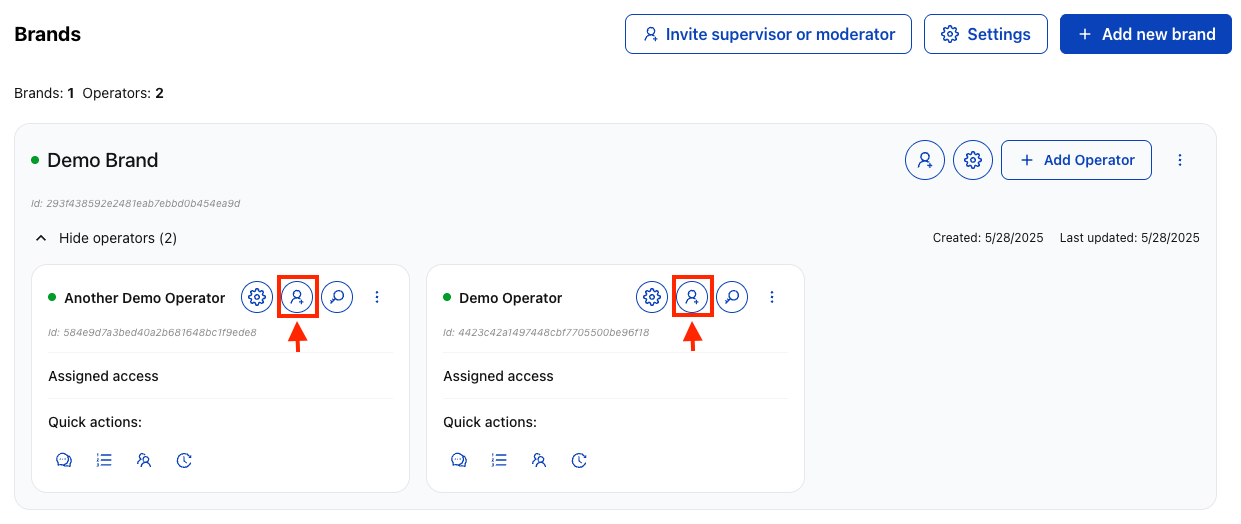
- Navigate to Dashboard
- Expand a brand to show operators
- Click the invite button on a specific operator card
#User Management Best Practices
#Role Assignment Strategy
Supervisors should be assigned when users need:
- Oversight across multiple operators within a brand
- Brand-wide configuration and management capabilities
- Ability to invite and manage other users
- Access to analytics and reporting across all operators
Moderators should be assigned when users need:
- Day-to-day content moderation responsibilities
- Access limited to specific operators or markets
- Focus on message review and user management tasks
- Regional or language-specific moderation duties
#Security and Access Control
- Principle of Least Privilege: Assign users only the minimum access required for their responsibilities
- Regular Access Reviews: Periodically audit user permissions and remove unnecessary access
- Prompt Deactivation: Immediately remove access when users leave the organization or change roles
- Clear Documentation: Maintain records of who has access to what and why
#Account Lifecycle Management
New User Onboarding:
#Send Invitation
Send invitation with appropriate role assignment.
#Email Instructions
User receives email with account setup instructions.
#Registration & Security
User completes registration and security setup.
#Training
Provide training on moderation tools and policies.
#Monitor & Support
Ongoing Management:
- Monitor user activity and moderation decisions
- Provide regular training updates on new features
- Review and adjust permissions based on changing responsibilities
- Maintain communication channels for support and escalation
User Deactivation:
- Remove access immediately upon role change or departure
- Archive user activity logs for compliance and auditing
- Transfer responsibilities to other team members
- Update documentation and contact lists
#Audit and Compliance
#Activity Tracking
- All user invitations and role changes are automatically logged
- Track moderation decisions made by each user
- Monitor login patterns and access usage
- Generate reports for compliance and performance review
#Access Reporting
- Regular reports on who has access to which brands/operators
- Track changes in user permissions over time
- Identify unused or excessive permissions
- Document access justifications for audit purposes
The user management in the Moderation Interface can be integrated with your existing identity management systems. Contact your Sportradar representative for information about SAML, OAuth, or other authentication integration options.