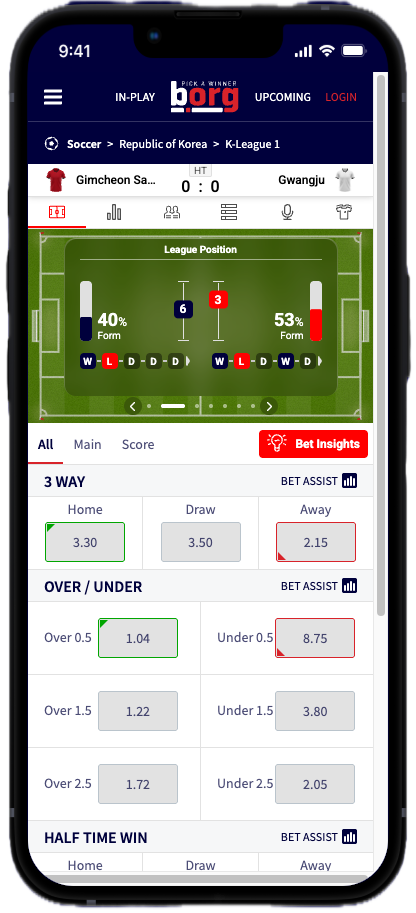
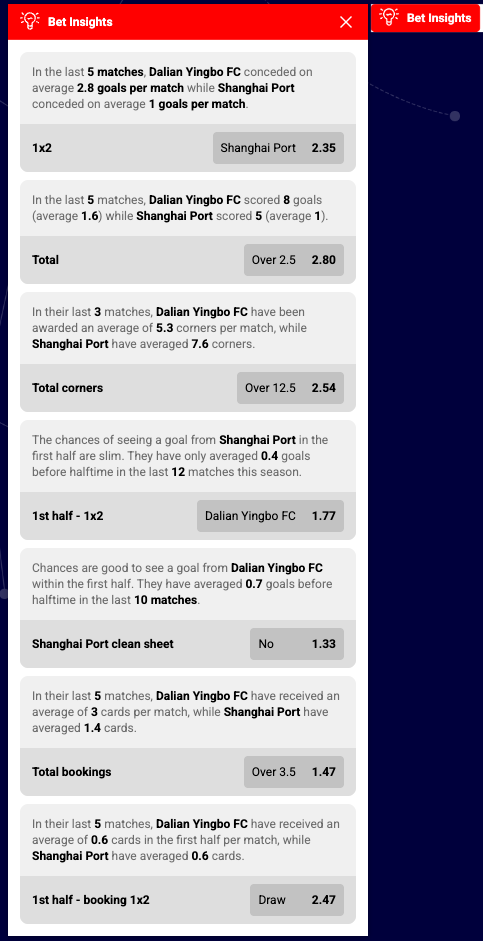
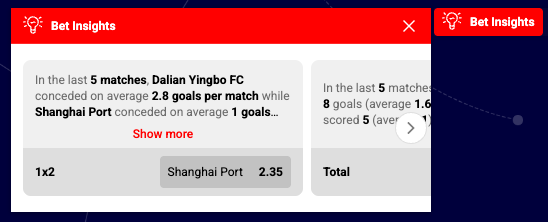
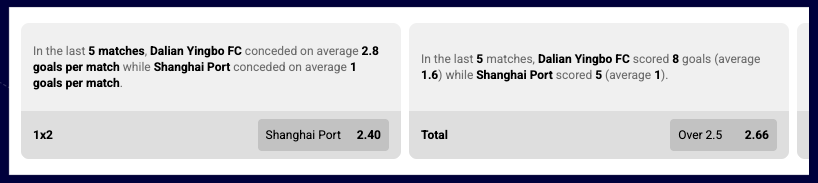
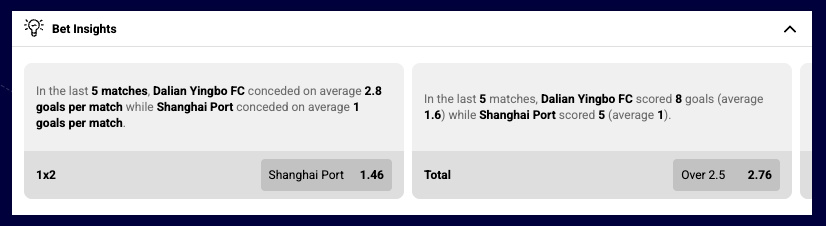
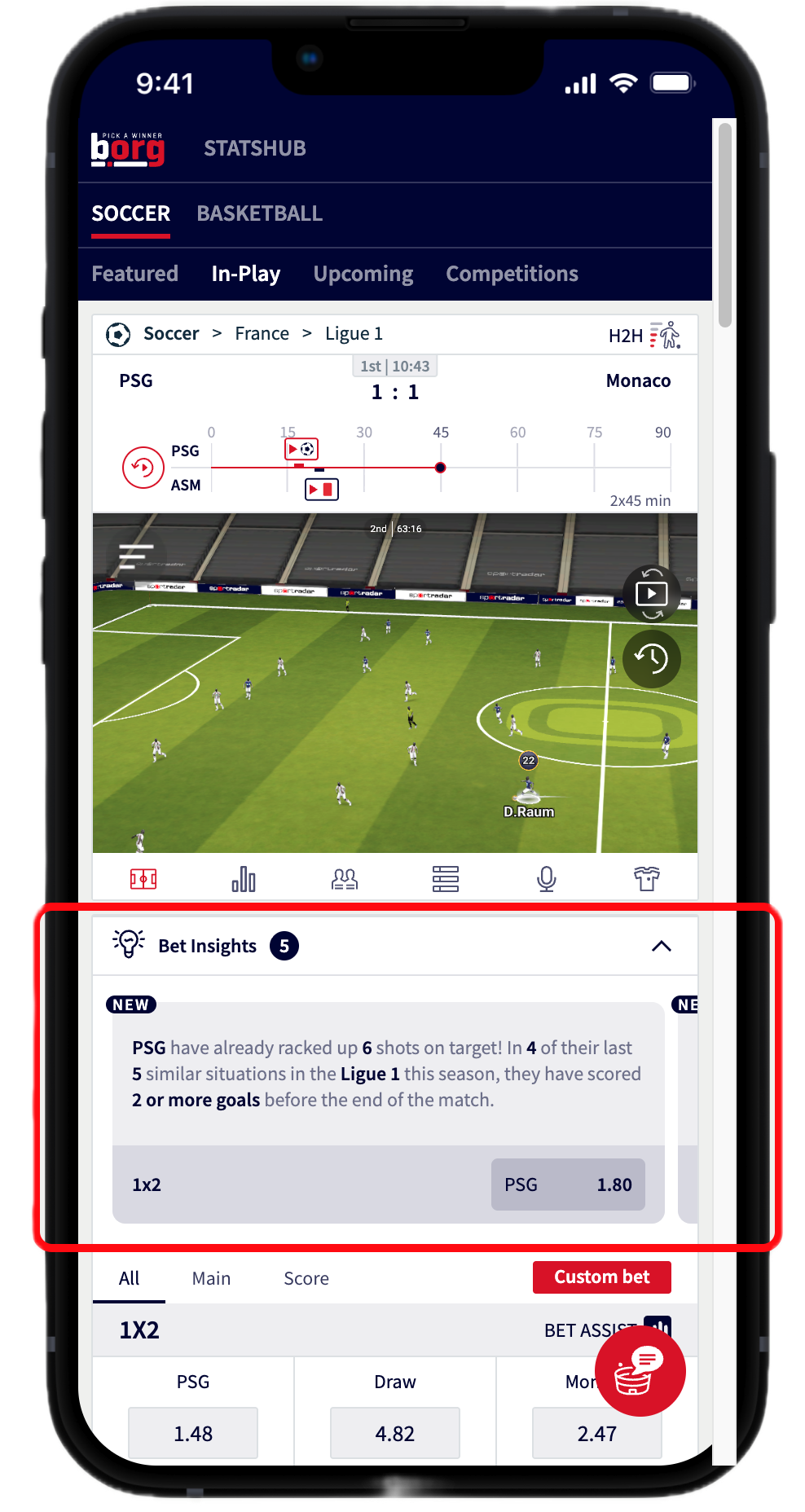
Bet Insights widget displays AI-powered betting insights and recommendations for specific markets within a match. The widget analyzes betting patterns, historical data, and statistical trends to highlight valuable betting opportunities with detailed market and outcome information. It provides intelligent suggestions to help users identify potentially profitable bets based on comprehensive data analysis. The widget offers flexible integration modes including inline display for dedicated sections or button-triggered modal for compact placements, multiple card layout variants for different use cases, and extensive customization options for visual presentation and user interaction patterns.
This widget requires Sportradar Unified Odds Feed (UOF) identifiers to correctly match insights to your offering and odds. If your platform does not use UOF IDs you will need to map UOF identifiers to your own market/outcome IDs. Mapping UOF to proprietary identifiers is complex and is difficult to achieve full coverage across all markets and specifier variants — expect limited support.
This widget requires the onItemClick callback to communicate user interactions with your application. Because HTML declarative integration cannot provide callback functions, the declarative method is not suited for this widget — use the JavaScript/programmatic integration shown in the examples below.

See the Bet Insights widget demo.
betInsightsRequired identifiers:
Environment Requirements
Supported Sports
Supported Languages
Supported Markets
For implementation guidance, example adapter implementations, and the adapter endpoint contract required by this widget, see the Adapter overview. It explains how to choose between Generic-Sportradar, custom-mapping, or self-hosted adapters and includes sample payloads you can adapt.
Betting insights rely on Sportradar's Unified Odds Feed (UOF) market and outcome identifiers. You must map those identifiers to your application's market/outcome IDs. While simple market mapping can be achieved for common markets, achieving complete coverage across all markets and variants is difficult.
See the Market and outcome mapping example for mapping guidance and examples.
eventMarkets or (market + availableMarketsForEvent)eventbetSlipSelection - visual representation of markets already in betslipThis is an example of an adapter implementing all endpoints. It is intended to be a copy/paste template, where only data fetching and transformation need to be implemented. When implementing an adapter, implement only the endpoints which are required by the widget being integrated, and discard the rest. For each endpoint, only the getData${ENDPOINT_NAME}() and transormData${ENDPOINT_NAME}() functions need to be implemented.
Expand Adapter Template Code
The widget can be embedded inline (always visible) or as a button that opens a pop-up overlay.

Always-visible insights displayed directly on the page — ideal for dedicated betting sections.
{The title in the widget header (or button label) can include or hide its icon.

{ widgetTitle: "Bet Insights" }Controls the visual style of each insight card.
Controls where the outcome name appears relative to the odds on each card.
| Position | Config | Description |
|---|---|---|
| Bottom (default) | outcomeButtonPosition: "bottom" | Outcome name below the odds |
| Top | outcomeButtonPosition: "top" | Outcome name above the odds |

Cards stacked vertically — suitable for narrow containers and sidebars.
{ cardsLayoutWhen using button integration (integration: "button"), controls which direction the pop-up opens.


Hides the widget header entirely in inline mode.
See the Bet Insights demo for live examples.
This section outlines the process required to integrate the Bet Insights widget into your platform.
Your sales contact person will initiate a shared communication channel via Slack invite to facilitate real-time collaboration between teams. This channel serves as the primary medium for answering questions, exchanging required information, and providing ongoing integration support.
Your sales contact person will organize a kickoff meeting with your technical team and Sportradar's integration team. This meeting serves as the formal start of the technical integration process and ensures both teams are aligned on requirements, timelines, and next steps. During the kickoff the teams will decide the adapter implementation type — this is important because Sportradar needs to confirm whether we have access to your odds and you can use generic adapter or if your platform uses Unified Odds Feed (UOF) identifiers. If your platform does not use UOF IDs, you may need to implement a custom adapter on your side; that decision can affect timeline, required effort, and the level of market coverage achievable.
Properties do not always transfer from the above table directly into integration code. Properties must be transformed differently for each integration method:
SIR() callcardVariant: "compact"In javascript integration, the properties go into an object which is passed as the 4th argument of the call ti SIR() function. Please see Global SIR API
data-sr- prefixcardVariant → data-sr-card-variantTo run this widget you must provision an adapter that supplies match and market data. The best adapter type depends on how your data is structured and delivered (for example: a Generic-Sportradar adapter, a custom mapping adapter, or a self-hosted adapter). During onboarding our team will review your data, recommend the optimal adapter, and assist with configuration. After the adapter type is chosen, use the matching example below for the correct integration and configuration steps.
Learn more about adapter options here.
Replace <CLIENT_ID> and <DATA_SOURCE> with the values provided during onboarding (for example client id: client1, data source: spider). In code use adapterDataSource: 'spider' and https://widgets.sir.sportradar.com/client1/widgetloader.
The following example shows how to respond when a user clicks an insight card. The onItemClick callback receives the click target and the outcome data, which you can use to build a selection object and push it into your bet slip. Walk through the highlighted sections to understand each part of the flow.
The following example shows how to connect the widget to your bet slip so it always reflects the punter's current selections. The adapter's betSlipSelection endpoint keeps the widget in sync, and onItemClick lets you act when the user clicks an outcome card. Walk through the highlighted sections to understand each part of the flow.
We recommend revalidating each selection and refreshing odds when adding them to the bet slip — or at minimum revalidating selections and odds immediately before accepting a bet — to ensure markets are still available and the odds presented to the user are up to date.
{
onItemClick: function(event, outcomeData) {
// Add to bet slip
betSlip.addSelection({
matchId: outcomeData.matchId,
marketId: outcomeData.market.id,
outcomeId: outcomeData.outcome.id,
odds: outcomeData.
The following example brings together the widgetloader, the adapter's betSlipSelection endpoint, and the onItemClick handler into a single ready-to-use snippet. Replace the placeholder values.
Replace <CLIENT_ID> and <DATA_SOURCE> with the values provided during onboarding (for example client id: client1, data source: spider). In code use adapterDataSource: 'spider' and https://widgets.sir.sportradar.com/client1/widgetloader.
<
The widget uses Sportradar Unified Odds Feed (UOF) market and outcome identifiers internally. When building a self-hosted adapter, you must map these identifiers to your own market/outcome IDs so the widget can display correct names, odds, and statuses.
To help verify your mapping, the widget provides a testMarkets prop that generates mocked markets and outcomes for a given matchId. This lets you confirm that every market renders correctly before you connect live data.
For quick testing, pass a pipe-delimited list of market IDs. Predefined specifiers are added automatically where needed:
SIR('addWidget', '#bet-insights', 'betInsights', {
matchId: 61591316,
testMarkets: "7|8"
});This generates mocked insights for market 7 and market 8 with their default specifiers.
When you need to test specific specifier values (or multiple values for the same market), use the advanced string format:
marketId1;specifier1,specifier2|marketId2;specifier1,specifier2Delimiters:
| Delimiter | Purpose |
|---|---|
| | Separates multiple market configurations |
; | Separates market ID from its specifier sets |
, | Separates multiple specifier sets for one market |
& | Separates multiple specifiers within the same set (for markets that use more than one specifier) |
A specifier is a key=value pair. Separate multiple specifier sets with a comma:
SIR('addWidget', '#bet-insights', 'betInsights', {
matchId: 61591316,
testMarkets: "7;score=1:0,score=1:1|8;total=0.5,total=1.5"
});This generates mocked insights for:
score=1:0score=1:1total=0.5total=1.5Some markets require more than one specifier. Use & to combine them within one set.
For example, market 1183 ("{player} total shots (inc. overtime)") uses both a total and a player specifier:
SIR('addWidget', '#bet-insights', 'betInsights', {
matchId: 61591316,
testMarkets: "1183;total=0.5&player=sr:player:1234,total=1.5&player=sr:player:2345"
});This generates mocked insights for:
total=0.5 and player=sr:player:1234total=1.5 and player=sr:player:2345At the moment Bet Insights does not support any market with multiple specifiers in production, but the testMarkets prop accepts them for forward-compatibility testing.
The following snippet loads the widgetloader, registers a self-hosted mocked adapter, and requests testMarkets for markets 1 (1x2), 18 (Total) and 8 ({!goalnr} goal). The adapter only returns markets 1 and 18, so the widget will display only those — with market 18 using the total=1.5 specifier.
Once you verify that the mocked markets render correctly, remove the testMarkets prop and connect your adapter to live data.
The following describes how the Bet Insights widget reacts to data, market and outcome state changes, and user interactions. It covers visibility rules, how selections and bet-slip events are handled, and how adapter updates or error states affect the widget UI and available actions.

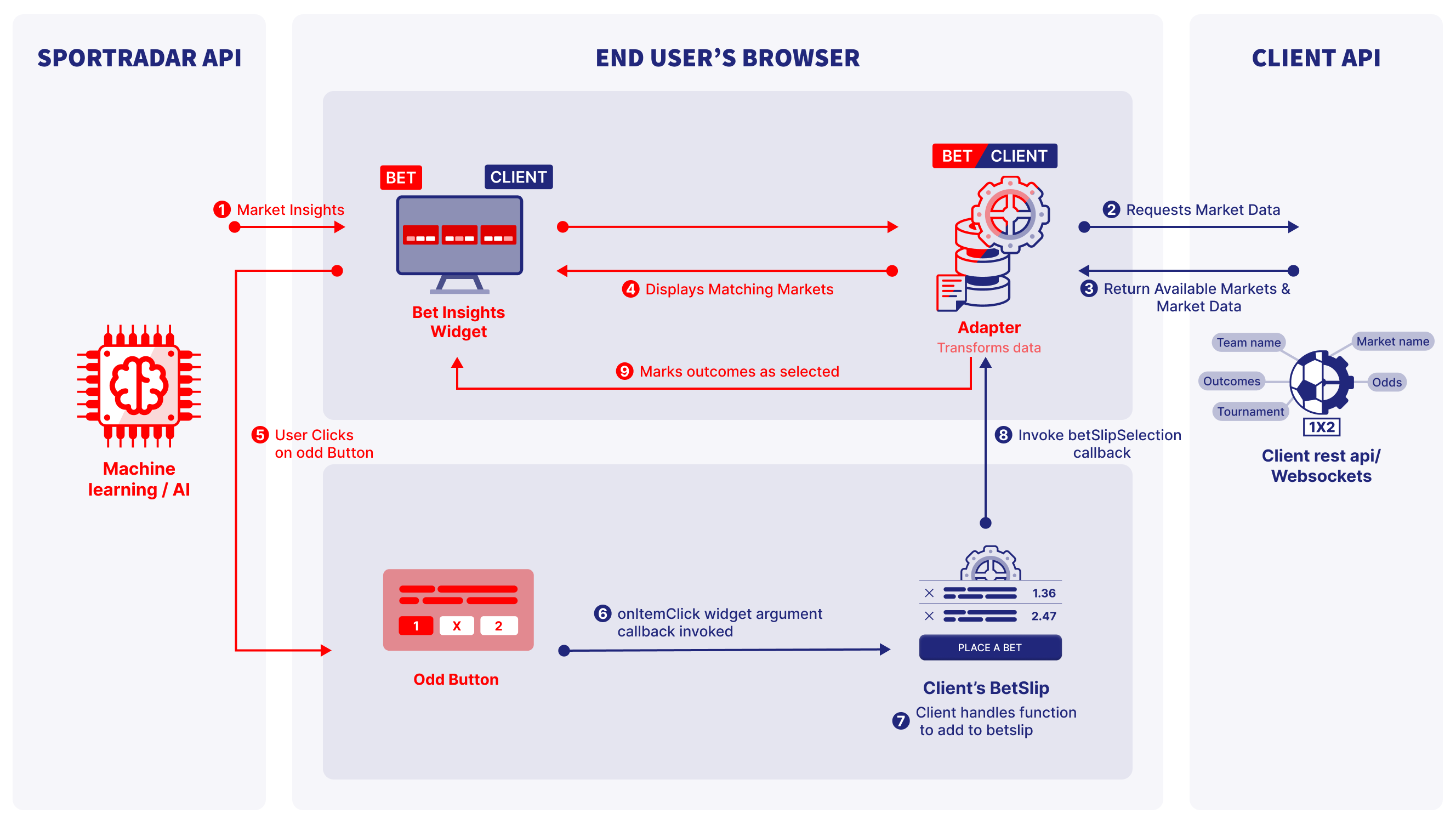
The diagram above illustrates the complete data lifecycle for the Bet Insights widget, which runs in the end user's browser and coordinates data between Sportradar and your systems:
onItemClick handler (6) so your app can add the selection to the bet slip (7).betSlipSelection subscription/callback that the widget registers; when your bet slip changes the Adapter invokes the callback (8–9) and the widget updates its UI to reflect current selections.
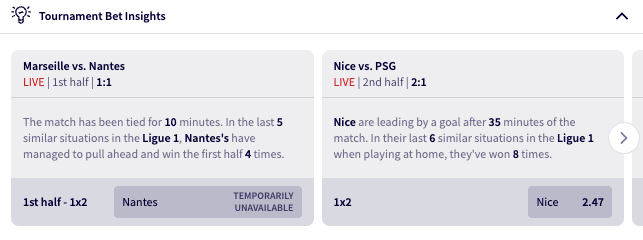
When market status is set to suspended, the widget disables that market's outcomes and displays the label "temporary unavailable" in place of odds, indicating the market is temporarily not available for betting.
const market = {
id: "1",
name: "Match Winner (1X2)",
outcomes: [
{ id: "1", name: "Home", status: "active", odds: { type: "eu", value: "2.10" } },
{ id: "X", name
If a market or outcome has any status other than active (for example: suspended or cancelled), the widget will hide that market to avoid showing stale or unavailable betting options.
Widget comes with pre-existing styling but can be customized by applying custom CSS properties to its different HTML elements. The widget's custom class selectors and supported CSS properties are listed below. Note that all custom classes must be nested within the .sr-bb.sr-<WIDGET_NAME> selector class. This ensures that the custom styles only apply to that widget and not to other elements on the page.
Replace <WIDGET_NAME> with insights!
.sr-bb.sr-insights {
.srct-ins-button {
border-radius: 2px;
}
.srct-ins-showmore {
color: #4786ff;
}
}Practical integration, performance, and UX tips for using the Bet Insights widget effectively.
Select integration mode based on page layout and user experience goals:

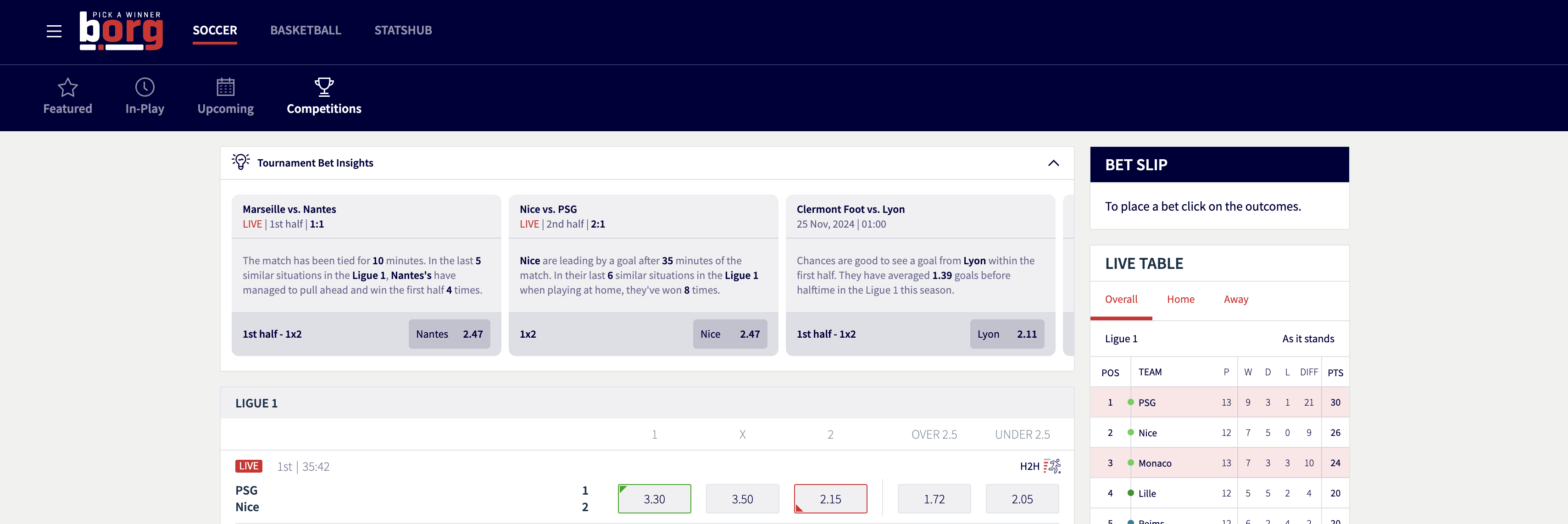
If your page is already a "one-stop shop" (like the screenshot, featuring a Bet Slip, Live Table, and Match Odds), the inline mode is ideal. It allows the insights to sit natively within the layout hierarchy, making the analysis feel like a core part of the product rather than a pop-up or a sidebar afterthought.
When matches are live, every second counts.
Contextual Betting: By placing insights directly above the odds, you provide immediate justification for a bet.
Visual Flow: Users can read a trend (e.g., "Nice are leading by a goal... they've won 8 times") and immediately click the odds in the table below to add it to their Bet Slip.
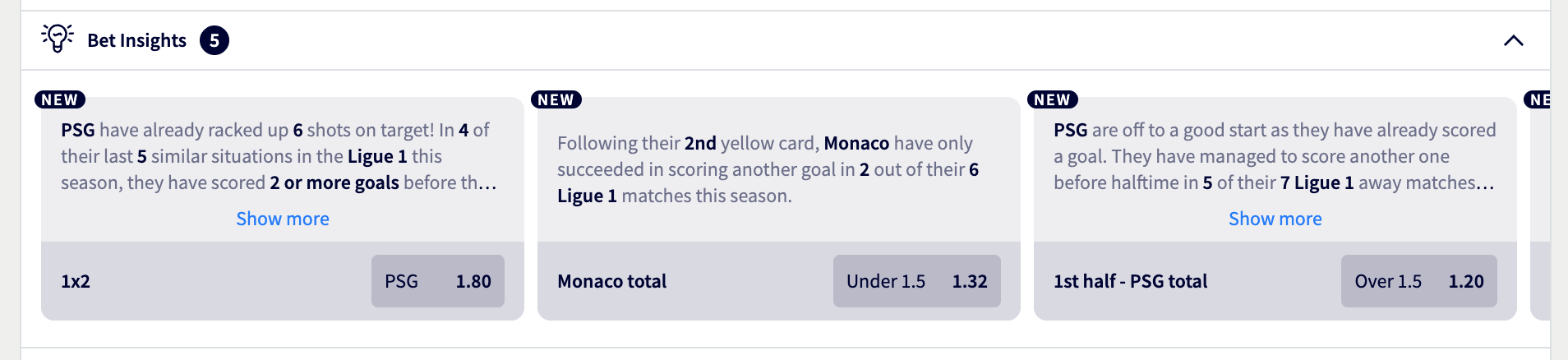
The inline mode is best used when you want the user to scroll and explore.
Horizontal Exploration: The carousel-style layout encourages users to swipe through different matches while staying on the same tournament page.
Secondary Content: It works perfectly as a "header" for specific leagues (like Ligue 1), providing a narrative summary before the user dives into the raw numbers of the matches below.
{
Learn how to obtain match IDs required for widget configuration.
Complete reference for the global SIR API function, including initialization, configuration options, and widget management methods
Customize widget appearance, colors, fonts, and styling to match your brand.
| Code | Language | Native |
|---|---|---|
sqi | Albanian | Shqip |
aa | Arabic | العربية |
hye | Armenian | Հայերեն |
aze | Azerbaijani | Azərbaycan dili |
bs | Bosnian | Bosanski |
bg | Bulgarian | Български |
zh | Chinese (Simplified) | 简体中文 |
zht | Chinese (Traditional) | 中文繁體 |
hr | Croatian | Hrvatski |
cs | Czech | Česky |
da | Danish | Dansk |
nl | Dutch | Nederlands |
en | English | |
en_us | English (US) | |
et | Estonian | Eesti |
fi | Finnish | Suomeksi |
fr | French | Français |
ka | Georgian | ქართული |
de | German | Deutsch |
el | Greek | Eλληνικά |
heb | Hebrew | עברית |
hi | Hindi | हिन्दी |
hu | Hungarian | Magyar |
isl | Icelandic | Íslenska |
id | Indonesian | Bahasa Indonesia |
it | Italian | Italiano |
ja | Japanese | 日本語 |
km | Khmer | ខ្មែរ |
ko | Korean | 한국어 |
lv | Latvian | Latviešu |
lt | Lithuanian | Lietuvių |
mk | Macedonian | Македонски |
no | Norwegian | Norsk |
pl | Polish | Polski |
pt | Portuguese | Português |
br | Portuguese (Brazil) | Português do Brasil |
ro | Romanian | Română |
ru | Russian | Русский |
sr | Serbian (Cyrillic) | Cрпски |
srl | Serbian (Latin) | Srpski |
sk | Slovak | Slovenčina |
sl | Slovenian | Slovenščina |
es | Spanish | Español |
sw | Swahili | Kiswahili |
se | Swedish | Svenska |
th | Thai | ไทย |
tr | Turkish | Türkçe |
tuk | Turkmen | |
ukr | Ukrainian | Українська |
vi | Vietnamese | Tiếng Việt |
| Market ID | Market Name |
|---|---|
| 1 | 1x2 |
| 8 | {!goalnr} goal |
| 9 | Last goal |
| 10 | Double chance |
| 11 | Draw no bet |
| 12 | {$competitor1} no bet |
| 13 | {$competitor2} no bet |
| 14 | Handicap {hcp} |
| 15 | Winning margin |
| 16 | Handicap |
| 18 | Total |
| 19 | {$competitor1} total |
| 20 | {$competitor2} total |
| 21 | Exact goals |
| 23 | {$competitor1} exact goals |
| 24 | {$competitor1} exact goals |
| 24 | {$competitor2} exact goals |
| 25 | Goal range |
| 26 | Odd/even |
| 27 | {$competitor1} odd/even |
| 28 | {$competitor2} odd/even |
| 29 | Both teams to score |
| 30 | Which team to score |
| 31 | {$competitor1} clean sheet |
| 32 | {$competitor2} clean sheet |
| 33 | {$competitor1} win to nil |
| 34 | {$competitor2} win to nil |
| 35 | 1x2 & both teams to score |
| 36 | Total & both teams to score |
| 37 | 1x2 & total |
| 38 | {!goalnr} goalscorer |
| 39 | Last goalscorer |
| 40 | Anytime goalscorer |
| 41 | Correct score [{score}] |
| 45 | Correct score |
| 46 | Halftime/fulltime correct score |
| 47 | Halftime/fulltime |
| 48 | {$competitor1} to win both halves |
| 49 | {$competitor2} to win both halves |
| 50 | {$competitor1} to win either half |
| 51 | {$competitor2} to win either half |
| 52 | Highest scoring half |
| 53 | {$competitor1} highest scoring half |
| 54 | {$competitor2} highest scoring half |
| 55 | 1st/2nd half both teams to score |
| 56 | {$competitor1} to score in both halves |
| 57 | {$competitor2} to score in both halves |
| 58 | Both halves over {total} |
| 59 | Both halves under {total} |
| 60 | 1st half - 1x2 |
| 62 | 1st half - {!goalnr} goal |
| 63 | 1st half - double chance |
| 64 | 1st half - draw no bet |
| 65 | 1st half - handicap {hcp} |
| 66 | 1st half - handicap |
| 68 | 1st half - total |
| 69 | 1st half - {$competitor1} total |
| 70 | 1st half - {$competitor2} total |
| 71 | 1st half - exact goals |
| 74 | 1st half - odd/even |
| 75 | 1st half - both teams to score |
| 76 | 1st half - {$competitor1} clean sheet |
| 77 | 1st half - {$competitor2} clean sheet |
| 78 | 1st half - 1x2 & both teams to score |
| 79 | 1st half - 1x2 & total |
| 81 | 1st half - correct score |
| 83 | 2nd half - 1x2 |
| 84 | 2nd half - {!goalnr} goal |
| 85 | 2nd half - double chance |
| 86 | 2nd half - draw no bet |
| 87 | 2nd half - handicap {hcp} |
| 88 | 2nd half - handicap |
| 90 | 2nd half - total |
| 91 | 2nd half - {$competitor1} total |
| 92 | 2nd half - {$competitor2} total |
| 93 | 2nd half - exact goals |
| 94 | 2nd half - odd/even |
| 95 | 2nd half - both teams to score |
| 96 | 2nd half - {$competitor1} clean sheet |
| 97 | 2nd half - {$competitor2} clean sheet |
| 98 | 2nd half - correct score |
| 100 | When will the {!goalnr} goal be scored (15 min interval) |
| 101 | When will the {!goalnr} goal be scored (10 min interval) |
| 105 | 10 minutes - 1x2 from {from} to {to} |
| 122 | Will there be a penalty shootout |
| 136 | Booking 1x2 |
| 137 | {!bookingnr} booking |
| 138 | Total booking points |
| 139 | Total bookings |
| 142 | Exact bookings |
| 143 | {$competitor1} exact bookings |
| 144 | {$competitor2} exact bookings |
| 146 | Sending off |
| 147 | {$competitor1} sending off |
| 148 | {$competitor2} sending off |
| 149 | 1st half - booking 1x2 |
| 150 | 1st half - {!bookingnr} booking |
| 151 | 1st half - total booking points |
| 152 | 1st half - total bookings |
| 153 | 1st half - {$competitor1} total bookings |
| 154 | 1st half - {$competitor2} total bookings |
| 155 | 1st half - exact bookings |
| 156 | 1st half - {$competitor1} exact bookings |
| 157 | 1st half - {$competitor2} exact bookings |
| 159 | 1st half - sending off |
| 160 | 1st half - {$competitor1} sending off |
| 161 | 1st half - {$competitor2} sending off |
| 162 | Corner 1x2 |
| 163 | {!cornernr} corner |
| 164 | Last corner |
| 165 | Corner handicap |
| 166 | Total corners |
| 167 | {$competitor1} total corners |
| 168 | {$competitor2} total corners |
| 169 | Corner range |
| 170 | {$competitor1} corner range |
| 171 | {$competitor2} corner range |
| 172 | Odd/even corners |
| 173 | 1st half - corner 1x2 |
| 174 | 1st half - {!cornernr} corner |
| 175 | 1st half - last corner |
| 176 | 1st half - corner handicap |
| 177 | 1st half - total corners |
| 180 | 1st half - {$competitor1} exact corners |
| 181 | 1st half - {$competitor2} exact corners |
| 182 | 1st half - Corner range |
| 183 | 1st half - odd/even corners |
| 184 | {!goalnr} goal & 1x2 |
| 199 | Correct score |
| 220 | Will there be overtime |
| 540 | Double chance (match) & 1st half both teams score |
| 541 | Double chance (match) & 2nd half both teams score |
| 542 | 1st half - double chance & both teams to score |
| 543 | 2nd half - 1x2 & both teams to score |
| 544 | 2nd half - 1x2 & total |
| 545 | 2nd half - double chance & both teams to score |
| 546 | Double chance & both teams to score |
| 547 | Double chance & total |
| 548 | Multigoals |
| 549 | {$competitor1} multigoals |
| 550 | {$competitor2} multigoals |
| 551 | Multiscores |
| 552 | 1st half - multigoals |
| 553 | 2nd half - multigoals |
| 770 | {player} assists (incl. overtime) |
| 775 | {player} goals (incl. overtime) |
| 776 | {player} shots (incl. overtime) |
| 777 | {player} shots on goal (incl. overtime) |
| 778 | {player} passes (incl. overtime) |
| 780 | {player} tackles (incl. overtime) |
| 818 | Halftime/fulltime & total |
| 819 | Halftime/fulltime & 1st half total |
| 820 | Halftime/fulltime & exact goals |
| 854 | {$competitor1} or over {total} |
| 855 | {$competitor1} or under {total} |
| 856 | Draw or over {total} |
| 857 | Draw or under {total} |
| 858 | {$competitor2} or over {total} |
| 859 | {$competitor2} or under {total} |
| 860 | {$competitor1} or both teams to score |
| 861 | Draw or both teams to score |
| 862 | {$competitor2} or both teams to score |
| 863 | {$competitor1} or any clean sheet |
| 864 | Draw or any clean sheet |
| 865 | {$competitor2} or any clean sheet |
| 879 | {$competitor2} to win |
| 880 | {$competitor1} to win |
| 881 | Any team to win |
| 882 | {player} to score (incl. overtime) |
| 888 | Anytime goalscorer & 1x2 |
| 889 | Anytime goalscorer & correct score |
| 890 | {!goalnr} goalscorer & correct score |
| 891 | {!goalnr} goalscorer & 1x2 |
| 1179 | 1st Half Result or Match Result |
| 1183 | {player} total shots (incl. overtime) |
| 1185 | {player} total shots on goal (incl. overtime) |
| 1187 | {player} total passes (incl. overtime) |
| 1189 | {player} total tackles (incl. overtime) |
| 1191 | {player} to be carded (incl. overtime) |
This widget requires an adapter to supply match, market and odds data. See the Adapter overview.
<script type="text/javascript">
// Widget loader script from Step 3
ndatory
// -------- Data + Transform functions --------
async function getDataMarket(args) {
// Here fetch data from your data source and return it
return {};
}
function transformDataMarket(data) {
// Here transform your data into data structure exemplified by the object below.
/*
// Illustration how data transformation might work from client data to Adapter types
return {
market: {
id: data.marketId,
name: data.marketName,
outcomes: data.outcomes.map((outcome) => { id: outcome.id, name: outcome.name, odds: outcome.odds } )
},
event: { id: data.eventId, type: data.eventType }
};
*/
return {
market: {
id: "sr:market:1",
name: "Match Winner",
outcomes: [
{ id: "1", name: "Home", odds: 2.5 },
{ id: "X", name: "Draw", odds: 3.0 },
{ id: "2", name: "Away", odds: 3.2 }
]
},
event: { id: "sr:match:12345", type: "uf" }
};
}
async function getDataAvailableMarketsForEvent(args) {
// Here fetch data from your data source and return it
return {};
}
function transformDataAvailableMarketsForEvent(data) {
// Here transform your data into data structure exemplified by the object below.
/*
// Illustration how data transformation might work from client data to Adapter types
return {
selection: data.map((selection) => { type: selection.type, event: selection.event, market: selection.market})
};
*/
return {
selection: [
{
type: "uf",
event: "61513908",
market: "1",
},
],
};
}
async function getDataEventMarkets(args) {
// Here fetch data from your data source and return it
return {};
}
function transformDataEventMarkets(data, args) {
// Here transform your data into data structure exemplified by the object below.
/*
// Illustration how data transformation might work from client data to Adapter types
let markets = []
function mapMarkets(market){
return {
id: market.id,
status: market.status,
name: market.name,
outcomes: market.outcomes.map((outcome) => {id: outcome.id, name: outcome.name , odds: { type: outcome.odds.type, value: outcome.odds.value}, status: outcome.status})
};
}
return data.forEach(mapMarkets);
*/
return {
event: args.selection.event,
markets: [
{
id: "1",
status: "active",
name: "1x2",
outcomes: [
{
id: "1",
name: "Tenhaisen",
odds: { type: "eu", value: "1.88" },
status: "active",
},
{
id: "2",
name: "draw",
odds: { type: "eu", value: "3.85" },
status: "active",
},
{
id: "3",
name: "Hoftenstain",
odds: { type: "eu", value: "3.7" },
status: "active",
},
],
},
],
};
}
async function getDataEvent(args) {
// Here fetch data from your data source and return it
return {};
}
function transformDataEvent(data) {
// Here transform your data into data structure exemplified by the object below.
/*
// Illustration how data transformation might work from client data to Adapter types
return {
event: {
id: data.event,
date: {
displayValue: data.displayTime,
startTime: data.dateTime,
},
sport: {
id: data.sport.id,
name: data.sport.name,
},
category: {
id: data.category.id,
name: data.category.country,
},
tournament: {
id: data.tournament.id,
name: data.tournament.name,
},
teams: data.teams.map((team) => {id: team.id, name: team.name}),
isLive: data.isLive,
},
};
*/
return {
event: {
id: args.selection.event,
date: {
displayValue: "14/01/26, 19:30",
startTime: "2026-01-14T19:30:00.000Z",
},
sport: {
id: "1",
name: "Soccer",
},
category: {
id: "30",
name: "Germany",
},
tournament: {
id: "42",
name: "Liga Supreme",
},
teams: [
{ id: "1270229", name: "Tenhaisen" },
{ id: "31531", name: "Hoftenstain" },
],
isLive: false,
},
};
}
async function getDataFilterMarkets(args) {
// Here fetch data from your data source and return it
return {};
}
function transformDataFilterMarkets(data) {
// Here transform your data into data structure exemplified by the object below.
/*
// Illustration how data transformation might work from client data to Adapter types
return {
selection: data.selection.map((market) => {type: market.type, event: market.event, market: market.id})
}
*/
return {
selection: [
{
type: "uf",
event: "61513908",
market: "1",
},
],
};
}
async function getDataBetSlipSelection(args) {
// Here fetch data from your data source and return it
return {};
}
function transformDataBetSlipSelection(data) {
// Here transform your data into data structure exemplified by the object below.
/*
// Illustration how data transformation might work from client data to Adapter types
return {
selection: data.selection.map((market) => {event: market.event, market: market.market, outcome: market.outcome, type: market.type}),
};
*/
return {
selection: [
{
event: "61513908",
market: "1",
outcome: "1",
type: "uf",
},
],
};
}
async function getDataCashBackSelections(args) {
// Here fetch data from your data source and return it
return {};
}
function transformDataCashBackSelections(data) {
// Here transform your data into data structure exemplified by the object below.
/*
// Illustration how data transformation might work from client data to Adapter types
return {
events: data.events.map((event) => {event: event.id, type: event.type}),
}
*/
return {
events: [
{
event: "56418457",
type: "uf",
},
],
};
}
async function getDataTickets(args) {
// Here fetch data from your data source and return it
return {};
}
function transformDataTickets(data) {
// Here transform your data into data structure exemplified by the object below.
/*
// Illustration how data transformation might work from client data to Adapter types
return {
tickets: data.tickets.map((ticket) => {
ticketId: ticket.id,
bets: ticket.bets.map((bet) => {
betId: bet.id,
selections: bet.selections.map((selection) => {
type: selection.type,
event: selection.event,
market: selection.market,
outcome: selection.outcome,
odds: { type: selection.odds.type, value: selection.odds.value },
}),
stake: bet.stake.map((stake) => {
type: stake.type,
currency: stake.currency,
amount: stake.amount,
mode: stake.mode
}),
}),
}),
};
*/
return {
tickets: [
{
ticketId: "ticket_123456",
bets: [
{
betId: "bet_001",
selections: [
{
type: "uf",
event: "sr:match:12345",
market: "1",
outcome: "1",
odds: { type: "eu", value: "2.10" }
}
],
stake: [{
type: "cash",
currency: "USD",
amount: "10.00",
mode: "total"
}]
}
],
type: "ticket",
version: "1.0"
}
]
};
}
async function getDataMatchEventSuggestedSelection(args) {
// Here fetch data from your data source and return it
return {};
}
function transformDataMatchEventSuggestedSelection(data) {
// Here transform your data into data structure exemplified by the object below.
/*
// Illustration how data transformation might work from client data to Adapter types
return {
selections: data.selections.map((selection) => {
event: selection.event,
market: selection.market,
outcome: selection.outcome,
type: selection.type,
specifiers: selection.specifiers
})
};
*/
return {
selections: [
{ event: "sr:match:12345", market: "1", outcome: "1", type: "uf" },
{ event: "sr:match:12345", market: "18", specifiers: "total=2.5", type: "uf" }
]
};
}
async function getDataRecommendedSelections(args) {
// Here fetch data from your data source and return it
return {};
}
function transformDataRecommendedSelections(data) {
// Here transform your data into data structure exemplified by the object below.
/*
// Illustration how data transformation might work from client data to Adapter types
return {
selection: data.selections.map((selection) => {
event: selection.event,
market: selection.market,
outcome: selection.outcome,
type: selection.type,
specifiers: selection.specifiers
})
};
*/
return {
selection: [
{ event: "sr:match:12345", market: "1", outcome: "1", type: "uf" },
{ event: "sr:match:67890", market: "18", specifiers: "total=2.5", outcome: "13", type: "uf" }
]
};
}
async function getDataCalculateCustomBetXML(args) {
// Here fetch data from your data source and return it
return {};
}
function transformDataCalculateCustomBetXML(data) {
// Here transform your data into data structure exemplified by the object below.
/*
// Illustration how data transformation might work from client data to Adapter types
return {
payload: '<xml>data</xml>',
}
*/
return {
payload: `<filtered_calculation_response generated_at="2025-04-16T13:29:08+00:00">
<calculation odds="27.50303106727931" probability="0.027418715351118873" harmonization="false"/>
<available_selections>
<event id="sr:match:12345678">
<markets>
<market id="65" specifiers="hcp=0:2" conflict="false">
<outcome id="1711" conflict="true"/>
<outcome id="1712" conflict="true"/>
<outcome id="1713" conflict="false"/>
</market>
...
</markets>
</event>
</available_selections>
</filtered_calculation_response>`
};
}
// -------- Adapter --------
const adapter = {
config: {},
endpoints: {
market: (args, callback) => {
getDataMarket(args)
.then(data => transformDataMarket(data))
.then(result => callback(undefined, result));
return () => {};
},
availableMarketsForEvent: (args, callback) => {
getDataAvailableMarketsForEvent(args)
.then(data => transformDataAvailableMarketsForEvent(data))
.then(result => callback(undefined, result));
return () => {};
},
eventMarkets: (args, callback) => {
getDataEventMarkets(args)
.then(data => transformDataEventMarkets(data, args))
.then(result => callback(undefined, result));
return () => {};
},
event: (args, callback) => {
getDataEvent(args)
.then(data => transformDataEvent(data, args))
.then(result => callback(undefined, result));
return () => {};
},
filterMarkets: (args, callback) => {
getDataFilterMarkets(args)
.then(data => transformDataFilterMarkets(data))
.then(result => callback(undefined, result));
return () => {};
},
betSlipSelection: (args, callback) => {
getDataBetSlipSelection(args)
.then(data => transformDataBetSlipSelection(data))
.then(result => callback(undefined, result));
return () => {};
},
cashBackSelections: (args, callback) => {
getDataCashBackSelections(args)
.then(data => transformDataCashBackSelections(data))
.then(result => callback(undefined, result));
return () => {};
},
tickets: (args, callback) => {
getDataTickets(args)
.then(data => transformDataTickets(data))
.then(result => callback(undefined, result));
return () => {};
},
matchEventSuggestedSelection: (args, callback) => {
getDataMatchEventSuggestedSelection(args)
.then(data => transformDataMatchEventSuggestedSelection(data))
.then(result => callback(undefined, result));
return () => {};
},
recommendedSelections: (args, callback) => {
getDataRecommendedSelections(args)
.then(data => transformDataRecommendedSelections(data))
.then(result => callback(undefined, result));
return () => {};
},
calculateCustomBetXML: (args, callback) => {
getDataCalculateCustomBetXML(args)
.then(data => transformDataCalculateCustomBetXML(data))
.then(result => callback(undefined, result));
return () => {};
},
},
};
</script>
Standard card with market name and outcome information.
{ cardVariant: "default" }{ integration: "button", modalPosition: "left" }{ disableWidgetHeader: true }| Property | Type | Required | Default | Description |
|---|---|---|---|---|
matchId | number | Yes | - | Sportradar match identifier. See Getting Identifiers |
integration | string | No | "inline" | Widget integration mode.
|
cardsLayout | string | No | "vertical" | Layout direction for insight cards.
|
cardVariant | string | No | "default" | Card display style variant.
|
outcomeOrder | string | No | "bottom" | Position of outcome name relative to odds. Options: "top", "bottom". Only applicable with cardVariant='compact', cardVariant='button', and cardVariant='buttonFooter' |
outcomeButtonPosition | string | No | "bottom" | Position of call-to-action button in card. Options: "top", "bottom". Not applicable with cardVariant='button' and cardVariant='buttonFooter' |
widgetTitle | string|false | No | "Bet Insights" | Title displayed in widget header or button label. Set to false to hide title |
widgetIcon | string|false | No | Default icon | URL of custom icon image for button/header. Set to false to hide icon |
disableWidgetHeader | boolean | No | false | When true, hides widget header in inline integration mode |
enableCollapse | boolean | No | true | When true, allows collapsing widget content in inline mode. Only applicable when disableWidgetHeader=false |
startCollapsed | boolean | No | false | When true and enableCollapse is true, widget starts in collapsed state |
modalPosition | string | No | "left" | Direction modal opens in button integration. Options: "left", "right", "bottom". Automatically adjusts for RTL languages |
modalMaxHeight | number|string | No | - | Maximum height of modal content. Allowed units: %, px, vh. When number (without units) is used, defaults to px. Only applicable with integration='button' and cardsLayout='vertical' |
isMobile | boolean | No | false | When set to true, opens pop-up on bottom edge of the viewport, stretched from left to right (only applicable with integration='button') |
minOdds | number | No | - | Minimum odds value filter. Only displays insights with odds greater than or equal to this value |
maxOdds | number | No | - | Maximum odds value filter. Only displays insights with odds less than or equal to this value |
ignoreAdapterValues | boolean | No | false | When true, uses Sportradar's standard market/outcome names instead of adapter-provided translations |
capitalizeMarketNameAndOutput | boolean | No | false | When true, capitalizes first letter of market names and outcome names |
onItemClick | function | No | - | Callback triggered when insight card or outcome is clicked. Receives event and outcome data for bet slip integration |
filters.sport.hidden → Complex objects must be passed as JSON stringsIn HTML integration, the properties go into the parent HTML object as object properties, prefixed with data-sr- as explained above.
This method supports only simple (base) properties and does not support properties that require functions.
In all examples replace sportradar in the widgetloader URL path with your clientId.
Example if your clientId is client1:
https://widgets.sir.sportradar.com/sportradar/widgetloaderhttps://widgets.sir.sportradar.com/client1/widgetloader<script>
(function(a,b,c,d,e,f,g,h,i){a[e]||(i=a[e]=function(){(a[e].q=a[e].q||[]).push(arguments)},i.l=1*new Date,i.o=f,
g=b.createElement(c),h=b.getElementsByTagName(c)[0],g.async=1,g.src=d,g.setAttribute("n",e),h.parentNode.insertBefore(g,h)
)})(window,document,"script","https://widgets.sir.sportradar.com/<CLIENT_ID>/widgetloader","SIR", {
language: 'en',
adapterDataSource: '<DATA_SOURCE>'
});
const widgetProps = {
// Required base props
matchId: 61591316,
// ... additional required props
// Setup-specific: Props that produce the configuration shown in #Main Configurable Features section
integration: "button",
modalPosition: "right"
// ... Optional: Additional customization props (see API Reference)
};
SIR('addWidget', '#bet-insights', 'betInsights', widgetProps);
</script>
<div id="bet-insights"></div> let betSlipChangeCallback = undefined;
let betSlipState = { // Simplified bet slip integration for demonstration purposes
selection: [],
};
// Called on user interactions
function onItemClick(target, data) {
if (target === 'externalOutcome') { // When user clicks an outcome on an insight card
// Construct a selection object in the shape your bet slip integration expects.
// The widget provides external IDs via data.externalEvent, data.externalMarket,
// and data.externalOutcome — map them to your own format below.
const bet = {
type: 'uf',
event: `${data.externalEvent.id}`,
market: `${data.externalMarket.id}`,
outcome: `${data.externalOutcome.id}`
};
if (data.externalMarket.specifier && data.externalMarket.specifier.value) {
bet.specifiers = `${data.externalMarket.specifier.value}`;
}
// Add the new selection
betSlipState = {
selection: [...betSlipState.selection, bet]
};
// Notify the adapter so the widget reflects the updated bet slip state
betSlipChangeCallback && betSlipChangeCallback(betSlipState);
}
}
const widgetProps = {
matchId: 61591316,
onItemClick: onItemClick,
// ... Additional customization props (see API Reference)
};
SIR('addWidget', '#bet-insights', 'betInsights', widgetProps); const adapter = {
endpoints: {
betSlipSelection: (args, callback) => {
yourBetSlipStore.onBetSlipChange((currentSelections) => {
callback(undefined, {
selection: currentSelections.map((sel) => ({
type: 'uf',
event: sel.eventId, // e.g., "sr:match:12345"
market: sel.marketId, // e.g., "38"
specifiers: sel.specifiers, // e.g., "goalNr=1" (optional)
outcome: sel.outcomeId, // e.g., "sr:player:1050245"
odds: { type: 'eu', value: sel.odds },
})),
});
});
return () => {
yourBetSlipStore.offBetSlipChange();
};
},
},
};
// USE ONLY ONE APPROPRIATE TO YOUR ADAPTER TYPE
SIR('registerAdapter', adapter); // Generic-Sportradar & Self-hosted
SIR('registerAdapter', '<HOSTED_ADAPTER_NAME>', adapter); // Custom-mapping
function onItemClick(args) {
if (args.type === 'addSelectionsToBetSlip') {
// Check if markets are still open and available
const isValid = checkSelectionValid(args.data.selections);
if (isValid) {
yourBetSlipStore.addSelections(
convertToStoreSelection(args.data.selections)
);
// Check if odds are the same as they were shown in widget
const haveOddsChanged = checkOdds(args.data.selections);
// Visual feedback
if (haveOddsChanged) {
showToast(`Odds have changed!, ${outcomeData.outcome.name} was added with adjusted odds.`);
} else {
showToast(`${outcomeData.outcome.name} added to bet slip`);
}
} else {
// Visual feedback
showToast(`Selection is no longer available.`);
}
}
}
const widgetProps = {
matchId: 61591316,
onItemClick: onItemClick,
// ... Additional customization props (see API Reference)
};
SIR('addWidget', '#bet-insights', 'betInsights', widgetProps);The testMarkets prop is intended for development and testing only — do not use it in production environments. It is only needed for self-hosted adapter implementations.
<script>
(function(a,b,c,d,e,f,g,h,i){a[e]||(i=a[e]=function(){(a[e].q=a[e].q||[]).push(arguments)},i.l=1*new Date,i.o=f,
g=b.createElement(c),h=b.getElementsByTagName(c)[0],g.async=1,g.src=d,g.setAttribute("n",e),h.parentNode.insertBefore(g,h)
)})(window,document,"script","https://widgets.sir.sportradar.com/sportradar/widgetloader","SIR", {
language: 'en'
});
const adapter = {
endpoints: {
event: (args, callback) => {
console.log(args); // development-only: logs incoming request args so developers can inspect payloads (remove in production)
callback(undefined, {
event: {
id: args.selection.event,
isLive: false,
date: {
displayValue: "2026-02-02 18:00",
startTime: "2026-02-02T18:00:00Z",
},
sport: { id: "sr:sport:1", name: "Soccer" },
category: { id: "sr:category:1", name: "England" },
tournament: { id: "sr:tournament:17", name: "Premier League" },
teams: [
{ id: "sr:competitor:1", name: "Manchester United" },
{ id: "sr:competitor:2", name: "Liverpool" },
],
},
});
return () => {};
},
market: (args, callback) => {
console.log(args); // development-only: logs incoming request args so developers can inspect payloads (remove in production)
callback(undefined, {
event,
markets: [
{
id: "1",
name: "1x2",
status: "active",
outcomes: [
{
id: "1",
name: "Home",
status: "active",
odds: { type: 'eu', value: "1.85" },
},
{
id: "X",
name: "Draw",
status: "active",
odds: { type: 'eu', value: "3.40" },
},
{
id: "2",
name: "Away",
status: "active",
odds: { type: 'eu', value: "4.20" },
},
],
},
{
id: "18",
name: "Total Goals",
specifiers: "total=1.5",
status: "active",
outcomes: [
{
id: "12",
name: "Over 2.5",
status: "active",
odds: { type: 'eu', value: "1.95" },
},
{
id: "13",
name: "Under 2.5",
status: "active",
odds: { type: 'eu', value: "1.85" },
},
],
},
],
});
return () => {};
},
},
};
SIR('registerAdapter', adapter);
SIR('addWidget', '#bet-insights', 'betInsights', {
matchId: 61591316,
testMarkets: "1|18;total=0.5,total=1.5|8"
});
</script>
<div id="bet-insights"></div>| Class | Customization options |
|---|---|
| srct-ins-button | background-color, border-radius |
| srct-ins-button__icon | color |
| srct-ins-button_text | color, font-size, font-family |
| srct-ins-header | background-color, border-color, border-width |
| srct-ins-header__icon | color |
| srct-ins-header__text | color, font-size, font-weight |
| srct-ins-header__arrow | color |
| srct-ins-container | background-color, font-family |
| srct-ins-card | background-color, border-radius, border-color, box-shadow |
| srct-ins-text | color, text-decoration |
| srct-ins-showmore | color, font-size |
| srct-ins-popup | background-color, color, font-size, font-family |
| srct-ins-popup__icon | color |
| srct-ins-cta | background-color, border-color |
| srct-ins-market | color, font-size, font-weight |
| srct-ins-market__icon | color |
| srct-ins-outcome | background-color, border-radius, padding |
| srct-ins-outcome--selected | background-color |
| srct-ins-outcome--disabled | background-color |
| srct-ins-outcome__name | color, font-size, font-weight |
| srct-ins-outcome__value | color, font-size, font-weight |
| srct-ins-bubble-count | background-color, border-color, color |
| srct-ins-bubble-count-text | color |
| srct-ins-bubble-new | background-color, border-color, color |
| srct-ins-robot-icon | color |
In a mobile view, screen real estate is at a premium. The inline mode stacks naturally between other page elements, ensuring that the insights don't overlap or hide important UI components like the navigation bar or the "Place Bet" button.
{
integration: 'button',
isMobile: true,
modalPosition: 'bottom'
}
Performance optimization, security considerations, and deployment strategies.