Skip to main content
Open Assistant Open Assistant
Self-Service Adapter | Engagement Tools | Sportradar Developer Documentation
Widgets, Engagement Tools, BET
Last updated 27 days ago
Is this site helpful? # What Is a Self-Service Adapter?A Self-Service Adapter is a custom integration layer that connects SIR Widgets to your betting data sources. Instead of using Sportradar's hosted adapter, you implement the data fetching logic yourself, giving you complete control over:
Data Sources – Connect to any odds/betting APIData Transformation – Map your API responses to the widget-expected formatCaching Strategy – Implement your own caching and optimizationReal-Time Updates – Control how and when data refreshes
# Understand the Adapter StructureThe adapter object consists of two primary properties:
configendpoints
Widget Configuration
Under config.widget, you can define settings for specific widgets. The keys here must match the widget names (e.g., betRecommendation.eventList).
Specific Widget Settings
Here is an example configuration for the betRecommendation.eventList widget, defining its layout and allowed markets.
Endpoints Definitions
The endpoints object is the most important part. It defines the mapping between widget data requests and your API. Every data requirement from a widget triggers a call to one of these methods.
Endpoint Implementation
Each endpoint function receives args containing the request context (like event ID or language) and a callback to return data or errors.
javascript
const adapter = { config : { widget : { 'betRecommendation.eventList' : { layout : { /* EventListMarketsConfig */ }, allowedMarkets : { /* SportMarketsMap */ } }, // ... other widgets } }, endpoints : { event :
# Understand the Adapter Data FlowThe following diagram illustrates how data flows from your backend API through the adapter and into the widget.
The adapter acts as a bridge, ensuring that whatever format your API returns is converted into the structure the widget expects.
# Workflow Breakdown
The sequence above is a general example. Each widget has its own unique data pattern, which is detailed in its specific documentation.
# Base Implementation ExampleStart with this basic HTML structure to implement your self-service adapter.
# Adapter ImplementationThe adapter is a JavaScript object that serves as the interface between your application's data layer and the SIR Widgets. It defines how widgets request data and how your application provides it.
# Implementing the Adapter EndpointsBefore implementing endpoints, review the endpoint type definitions in Types so you understand the required shapes, fields, and callback contracts.
Now implement the complete adapter with all core endpoints. Here's the full adapter implementation with mock data:
# Example: Mocked Data AdapterHere's the complete HTML file with all pieces assembled:
Code Block
# Connect to Your APITo connect to your actual betting API, you need to replace the mock data with actual network requests. This typically involves fetching data from your backend and transforming it to match the structure expected by the widget.
# Adding Real-Time UpdatesFor live events, it is crucial to keep odds and market status up to date. You can achieve this using polling or WebSockets. Here is an example using polling:
# Further ReadingOnce you've completed this general integration tutorial, refer to widget-specific guides for detailed implementation patterns:
Bet Insights Widget – Coming soon
Bet Recommendation Widgets – Coming soon
Swipe Bet Widget – Coming soon
(
args
,
callback
)
=>
{
// Fetch and return event data
// Return optional unsubscribe function
},
eventMarkets : ( args , callback ) => {
// Fetch and return markets for event
},
market : ( args , callback ) => {
// Fetch and return specific market
}
// ... other endpoints
}
};
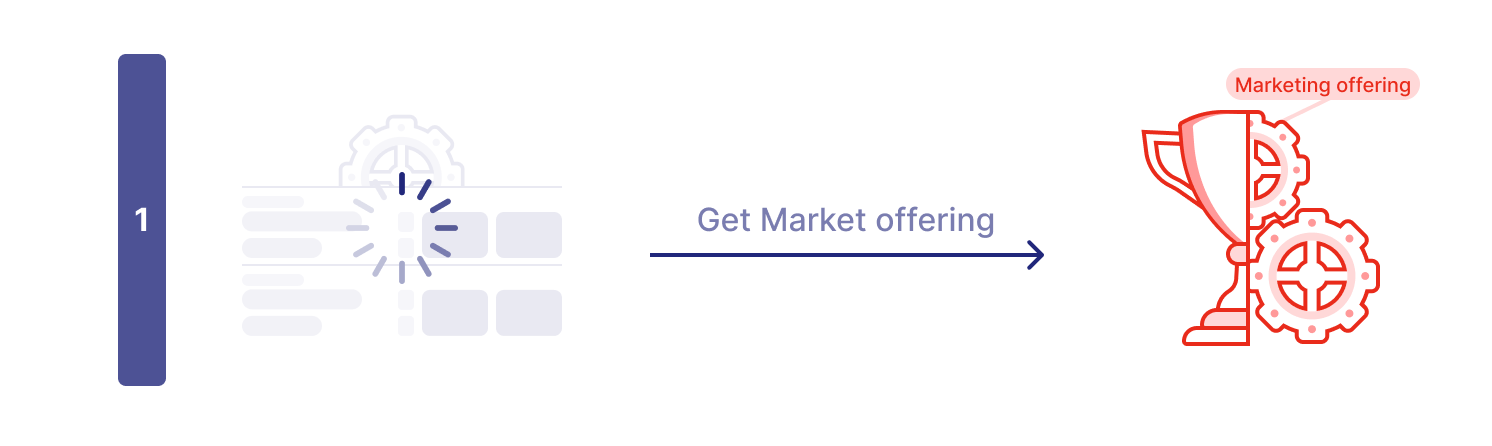
The widget starts by asking the adapter which markets are available for each event using the availableMarketsForEvent endpoint.
Example: The widget requests available markets for Event A, Event B, and Event C.
The adapter responds to each request with the available markets for that event.
Example: For Event A, the adapter returns "1x2" and "Spread" markets. For Event B, only "1x2" is available. For Event C, no data is returned (e.g., event expired). The widget displays placeholders while it loads detailed data.
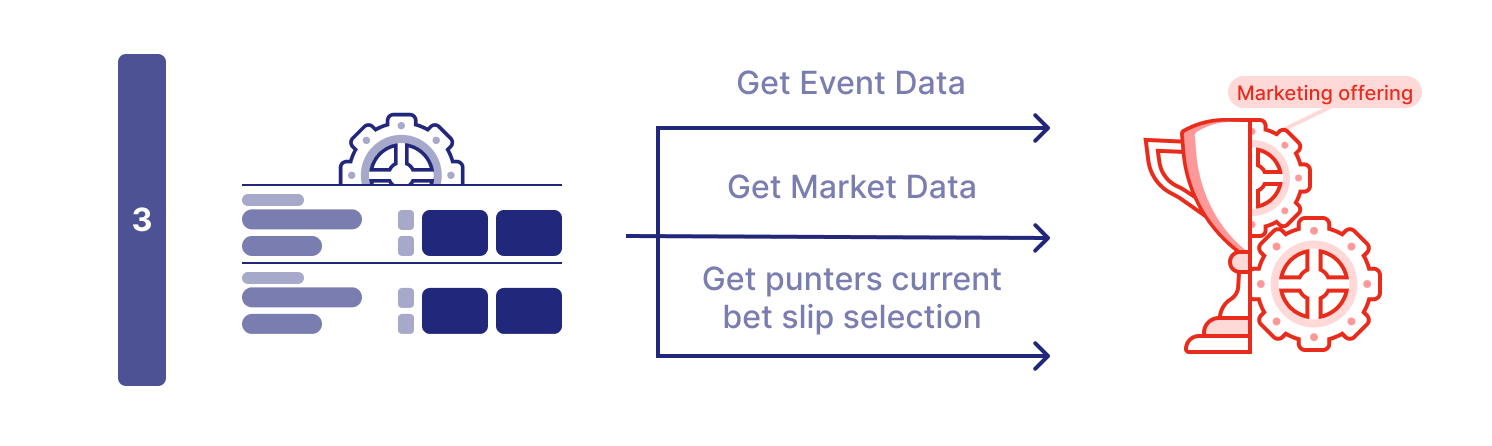
Data Retrieval Phase:
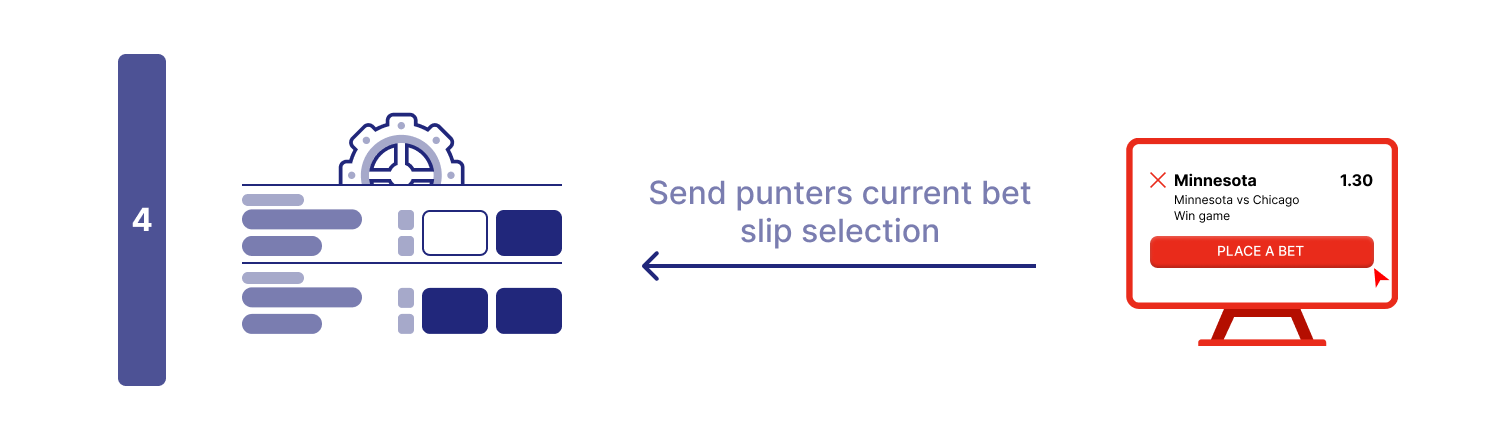
The widget now requests all the data it needs in parallel. It calls the market endpoint for odds and outcomes, the event endpoint for event details (like team names and scores), and the betSlipSelection endpoint to check the user's current selections.
Example: For Event A, the widget requests both "1x2" and "Spread" markets. For Event B, it requests "1x2". It also fetches event details for both events and checks the user's bet slip selections.
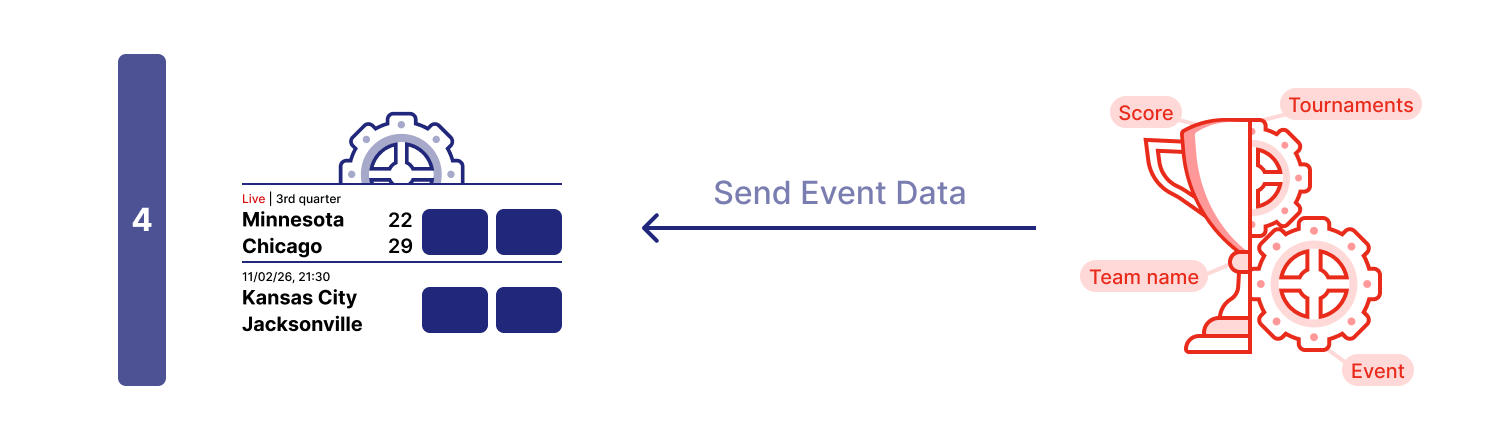
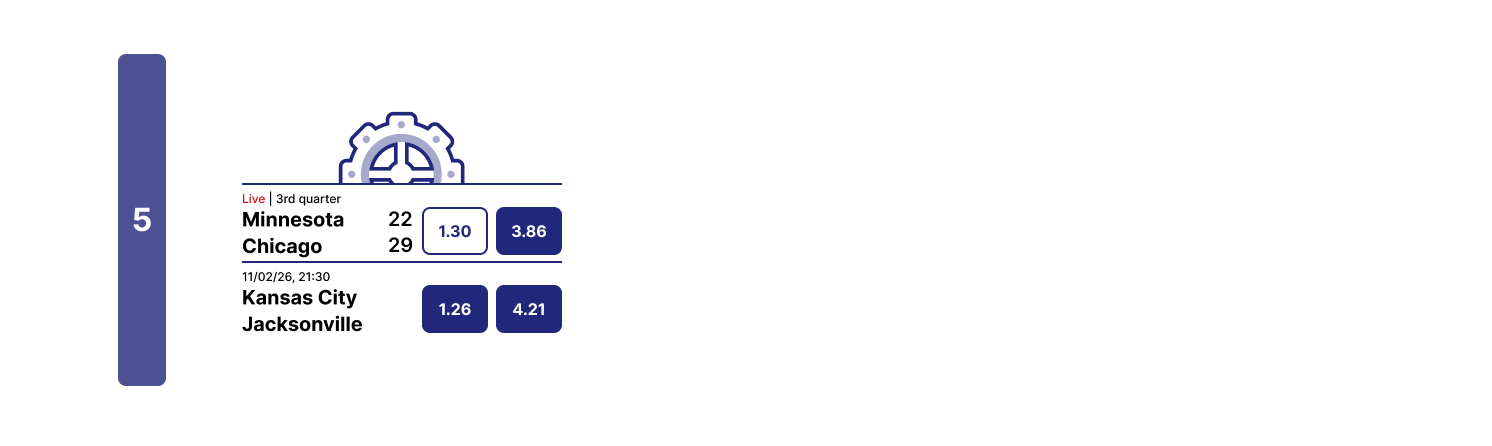
When the widget receives data from the event endpoint, it fills in the placeholders with event information.
Example: Team names, scores, match period, and start time are displayed.
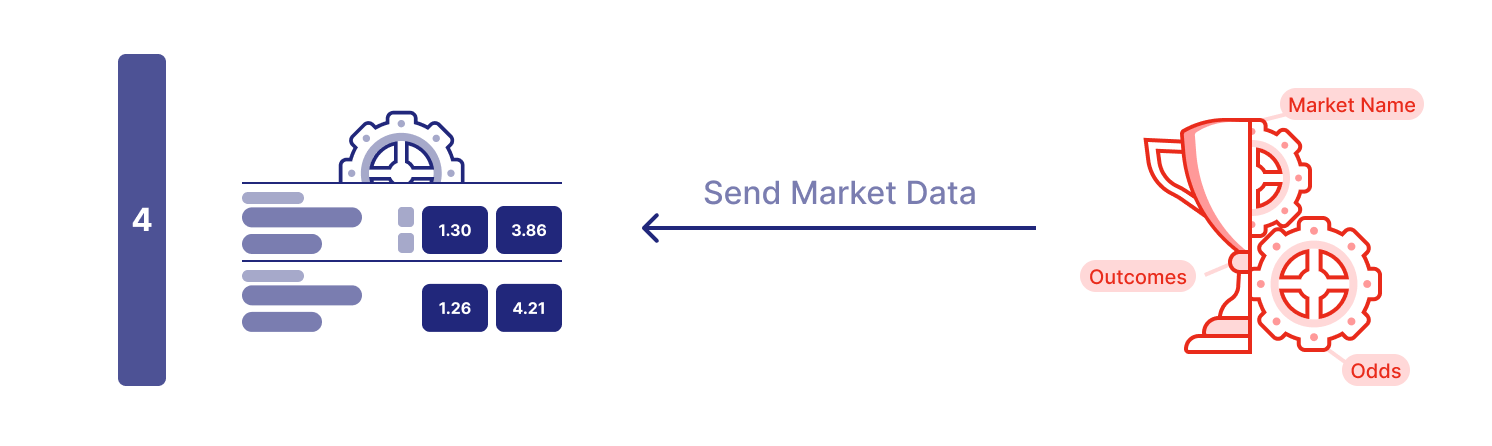
When the widget receives data from the market endpoint, it fills in the odds and outcomes for each market.
Example: The widget displays the latest odds for each outcome.
When the widget receives data from the betSlipSelection endpoint, it updates the UI to reflect the user's current selections.
Example: If the user has already selected outcome 1 for the "1x2" market in Event A, the widget marks it as selected.
Once all endpoint requests have returned data (or timed out), the widget displays the complete information to the user.
Previous slide Next slide
Styling
If you are working from starting standalone HTML file add CSS styles for the widget container.
When integrating into an existing website, style the widget container according to your page design instead of using these example styles.
Widget Loader Script
Add the SIR widget loader script in the <head> section. This loads the widget framework asynchronously and makes the global SIR function available.
Make sure to replace:
<YOUR_CLIENT_ID> with your actual Sportradar client ID.
Adapter Implementation
Here goes your adapter implementation code. Example using mocked data is in Self-Service Implementation - Mocked Data Example .
Register Adapter
Register the adapter object using SIR("registerAdapter", adapter). This must be done once before adding any widgets.
Add Widget
Initialize the widget using SIR("addWidget", ...) inside a load event listener. This ensures the widget is added after the page and framework are valid.
Make sure to replace:
<WIDGET_NAME> with the actual widget name (e.g. betInsights)...widgetProps with the specific properties for that widget (e.g., { matchId: 12345678 })
Widget Container
Create a container element (#sr-widget) where the widget will be rendered. Widgets need a target element to mount into.
html
<!DOCTYPE html > < html > < head > < meta name = "viewport" content = "width=device-width, initial-scale=1.0" /> < meta http-equiv = "Content-Type" content = "text/html; charset=UTF-8" /> < title > Self-Service Adapter Demo </ title > < style > body { display : flex ; justify-content : center ; } . widgets { max-width : 620 px ; width : 100% ; } . sr-widget { border : rgba ( 0 , 0 , 0 , 0.12 ) solid 1 px ; } < / style > < script type = "text/javascript" > ( function ( a , b , c , d , e , f , g , h , i ){ a[e] || (i = a[e] = function (){ (a[e] . q = a[e] . q || []) . push (arguments) }, i . l = 1 * new Date , i . o = f , g = b . createElement (c) , h = b . getElementsByTagName ) } )(window , document , "script" , "https://widgets.sir.sportradar.com/<YOUR_CLIENT_ID>/widgetloader" , "SIR" , { language : 'en' // SIR global options } ) ; const adapter = { // < Adapter code will go here > }; SIR ( "registerAdapter" , adapter) ; SIR ( "addWidget" , "#sr-widget" , "<WIDGET_NAME>" , { ... widgetProps // Replace with widget props } ) ; < / script > </ head > < body > < div class = "widgets" > < div id = "sr-widget" > Widget will load here... </ div > </ div > </ body > </ html >
EventMarkets Endpoint
Called to fetch all betting markets and odds for a specific event. Receives selection, language, and oddsType args. Returns an array of markets, each containing outcomes with current odds and status.
Event Endpoint
Called to fetch basic event information for display in widget headers and metadata. Receives selection args. Returns event details including teams, date, sport, category, and tournament information.
FilterMarkets Endpoint
Called to filter down available markets for widget-specific requirements. Receives widget and eventsSelection args. This acts as a filter to exclude markets. For example: two widgets for the same event share a single availableMarketsForEventfilterMarkets
BetSlipSelection Endpoint
Called once at initialization to subscribe to the bettor's bet slip selections. Takes no args. Save the callback function and invoke it whenever the bet slip changes to keep widgets synchronized with the user's current selections. See BetSlipSelectionFunction
CashBackSelections Endpoint
Called to retrieve events eligible for cashback offers. Takes no args. See CashBackSelectionsFunction
Tickets Endpoint
Called to retrieve the bettor's placed bets (tickets) for bet-sharing flows in Virtual Stadium (chat bet-share picker) and Central Hub (share-betslip list). The widget stack invokes your tickets(args, callback) once when the bet-share picker opens; your code calls callback(undefined, data) to deliver the response (and may call it again for pagination only). The widget never calls callback. Return an unsubscribe function to cancel any in-flight fetch when the picker closes.
Receives TicketsRequestendCustomerId, optional events / channelId). Returns TicketResponseV2
Choose one of two implementation methods — see Two ways to implement the tickets endpoint :
Option A (non-paginated): return the full tickets array in a single callback (tested and recommended).Option B (paginated): return the first page with pageSize / hasMore / nextCursor; call the stored callback with newTickets after onAction ticketsFetchMore.
Step-by-step examples: Adapter Tickets Endpoint Example (Track A / Track B). See also Ticket
html
<!DOCTYPE html > < html > < head > < meta name = "viewport" content = "width=device-width, initial-scale=1.0" /> < meta http-equiv = "Content-Type" content = "text/html; charset=UTF-8" /> < title > Self-Service Adapter Demo </ title > <!-- CSS styles from Step 2 --> < script type = "text/javascript" > // Widget loader script from Step 3 const adapter = { config : {}, endpoints : { availableMarketsForEvent <!DOCTYPE html > < html > < head > < meta name = "viewport" content = "width=device-width, initial-scale=1.0" /> < meta http-equiv = "Content-Type" content = "text/html; charset=UTF-8" /> < title > Self-Service Adapter Demo </ title > < style > body { display : flex ; justify-content : center ; } . widgets { max-width : 620 px ; width : 100% ; } . sr-widget { border : rgba ( 0 , 0 , 0 , 0.12 ) solid 1 px ; } < / style > < script type = "text/javascript" > ( function ( a , b , c , d , e , f , g , h , i ){ a[e] || (i = a[e] = function (){ (a[e] . q = a[e] . q || []) . push (arguments) }, i . l = 1 * new Date , i . o = f , g = b . createElement (c) , h = b . getElementsByTagName ) } )(window , document , "script" , "https://widgets.sir.sportradar.com/sportradar/widgetloader" , "SIR" , { language : 'en' // SIR global options } ) ; const adapter = { config : {}, endpoints : { availableMarketsForEvent : ( args , callback ) => { callback ( undefined , { selection : [ { type : "uf" , event : "61513908" , market : "1" , }, ] , } ) ; return () => {}; }, eventMarkets : ( args , callback ) => { callback ( undefined , { event : args . selection . event , markets : [ { id : "1" , status : "active" , name : "1x2" , outcomes : [ { id : "1" , name : "Tenhaisen" , odds : { type : "decimal" , value : "1.88" , }, status : "active" , }, { id : "2" , name : "draw" , odds : { type : "decimal" , value : "3.85" , }, status : "active" , }, { id : "3" , name : "Hoftenstain" , odds : { type : "decimal" , value : "3.7" , }, status : "active" , }, ] , }, ] , } ) ; return () => {}; }, event : ( args , callback ) => { callback ( undefined , { event : { id : args . selection . event , date : { displayValue : "14/01/26, 19:30" , startTime : "2026-01-14T19:30:00.000Z" , }, sport : { id : "1" , name : "Soccer" , }, category : { id : "30" , name : "Germany" , }, tournament : { id : "42" , name : "Liga Supreme" , }, teams : [ { id : "1270229" , name : "Tenhaisen" , }, { id : "31531" , name : "Hoftenstain" , }, ] , isLive : false , }, } ) ; return () => {}; }, filterMarkets : ( args , callback ) => { callback ( undefined , { selection : [ { type : "uf" , event : "61513908" , market : "1" , }, ] , } ) ; return () => {}; }, betSlipSelection : ( args , callback ) => { callback ( undefined , { selection : [ { event : "61513908" , market : "1" , outcome : "1" , type : "uf" , }, ] , } ) ; return () => {}; }, cashBackSelections : ( args , callback ) => { callback ( undefined , { events : [ { event : "56418457" , type : "uf" , }, ] , } ) ; return () => {}; }, }, }; SIR ( "registerAdapter" , adapter) ; window . addEventListener ( 'load' , function () { SIR ( "addWidget" , "#sr-widget" , "betInsights" , { matchId : 61513908 , testMarkets : "1" } ) ; } ) ; < / script > </ head > < body > < div class = "widgets" > < div id = "sr-widget" > Widget will load here... </ div > </ div > </ body > </ html >
Fetch Data
Perform an asynchronous request (e.g., using fetch) to your API endpoint. Ensure you handle HTTP errors appropriately.
Transform Data
This is the most critical step. Your API response likely has a different structure than what the widget expects. You must map your data fields to the specific format required by the SIR Adapter interface.
Return Data via Callback
Once the data is transformed, invoke the callback function with undefined as the first argument (no error) and your transformed data object as the second argument.
Handle Errors
If the fetch fails or transformation errors occur, call the callback with the error object as the first argument. This allows the widget to display an error state or retry.
javascript
event : ( args , callback ) => { const eventId = args . selection . event ; fetch ( `https://your-api.com/events/ ${ eventId } ` ) . then ( response => { if ( ! response . ok) throw new Error ( `HTTP ${ response . status } ` ) ; return response . json () ; } ) . then ( apiData => { // Transform your API response to match the expected format const eventData = { event : { id : apiData . id , date : { displayValue : formatDate (apiData . startTime) , startTime : apiData . startTime }, sport : { id : apiData . sportId , name : apiData . sportName }, category : { id : apiData . categoryId , name : apiData . categoryName }, tournament : { id : apiData . tournamentId , name : apiData . tournamentName }, teams : apiData . competitors . map ( c => ( { id : c . id , name : c . name } )) , isLive : apiData . status === "live" } }; callback ( undefined , eventData) ; } ) . catch ( error => { callback (error) ; } ) ; return () => { // Cancel pending request if needed }; }
Data Fetching
Define a function to fetch the latest data from your API. When data returns, transform it and call the callback with the new data. This ensures the widget always displays the most recent information.
Polling Mechanism
Call the fetch function immediately to get initial data, then set up an interval to call it repeatedly (e.g., every 3 seconds). This creates a simple polling mechanism for real-time updates.
Cleanup (Unsubscribe)
Crucial: Return a cleanup function. The widget calls this function when it unmounts or when the event selection changes. You must clear intervals or close WebSocket connections here to prevent memory leaks and unnecessary network traffic.
javascript
eventMarkets : ( args , callback ) => { const eventId = args . selection . event ; let intervalId ; const fetchMarkets = () => { fetch ( `https://your-api.com/events/ ${ eventId } /markets` ) . then ( res => res . json ()) . then ( data => { callback ( undefined , transformMarketsData (data)) ; } ) . catch ( err => callback (err)) ; }; // Initial fetch fetchMarkets () ; // Poll every 3 seconds for live updates intervalId = setInterval (fetchMarkets , 3000 ) ; // Return cleanup function return () => { clearInterval (intervalId) ; }; } (c)[
0
]
,
g
.
async
=
1
,
g
.
src
=
d
,
g
.
setAttribute
(
"n"
,
e)
,
h
.
parentNode
.
insertBefore
(g
,
h)
:
(
args
,
callback
)
=>
{
callback ( undefined , {
selection : [
{
type : "uf" ,
event : "61513908" ,
market : "1" ,
},
] ,
} ) ;
return () => {};
},
eventMarkets : ( args , callback ) => {
callback ( undefined , {
event : args . selection . event ,
markets : [
{
id : "1" ,
status : "active" ,
name : "1x2" ,
outcomes : [
{
id : "1" ,
name : "Tenhaisen" ,
odds : {
type : "decimal" ,
value : "1.88" ,
},
status : "active" ,
},
{
id : "2" ,
name : "draw" ,
odds : {
type : "decimal" ,
value : "3.85" ,
},
status : "active" ,
},
{
id : "3" ,
name : "Hoftenstain" ,
odds : {
type : "decimal" ,
value : "3.7" ,
},
status : "active" ,
},
] ,
},
] ,
} ) ;
return () => {};
},
event : ( args , callback ) => {
callback ( undefined , {
event : {
id : args . selection . event ,
date : {
displayValue : "14/01/26, 19:30" ,
startTime : "2026-01-14T19:30:00.000Z" ,
},
sport : {
id : "1" ,
name : "Soccer" ,
},
category : {
id : "30" ,
name : "Germany" ,
},
tournament : {
id : "42" ,
name : "Liga Supreme" ,
},
teams : [
{
id : "1270229" ,
name : "Tenhaisen" ,
},
{
id : "31531" ,
name : "Hoftenstain" ,
},
] ,
isLive : false ,
},
} ) ;
return () => {};
},
filterMarkets : ( args , callback ) => {
callback ( undefined , {
selection : [
{
type : "uf" ,
event : "61513908" ,
market : "1" ,
},
] ,
} ) ;
return () => {};
},
betSlipSelection : ( args , callback ) => {
callback ( undefined , {
selection : [
{
event : "61513908" ,
market : "1" ,
outcome : "1" ,
type : "uf" ,
},
] ,
} ) ;
return () => {};
},
cashBackSelections : ( args , callback ) => {
callback ( undefined , {
events : [
{
event : "56418457" ,
type : "uf" ,
},
] ,
} ) ;
return () => {};
},
tickets : ( args , callback ) => {
callback ( undefined , {
tickets : [
{
ticketId : "ticket_123456" ,
bets : [
{
betId : "bet_001" ,
selections : [
{
type : "uf" ,
productId : "1" ,
eventId : "sr:match:12345" ,
marketId : "1" ,
outcomeId : "1" ,
odds : { type : "decimal" , value : "2.10" },
context : {
eventName : "Manchester United vs Liverpool" ,
marketName : "1x2" ,
outcomeName : "Home" ,
tournament : "Premier League" ,
sportName : "Soccer" ,
categoryName : "England" ,
isLive : false ,
eventStartTime : "1738519200000" ,
sportId : "1"
}
}
] ,
odds : { type : "decimal" , value : "2.10" },
stake : [ {
type : "cash" ,
currency : "USD" ,
amount : "10.00" ,
mode : "total"
} ] ,
payout : [ { type : "cash" , currency : "USD" , amount : "21.00" } ]
}
] ,
version : "2.0"
}
]
} ) ;
return () => {};
},
},
};
< / script >
</ head >
< body >
< div class = "widgets" >
< div id = "sr-widget" > Widget will load here... </ div >
</ div >
</ body >
</ html >
(c)[
0
]
,
g
.
async
=
1
,
g
.
src
=
d
,
g
.
setAttribute
(
"n"
,
e)
,
h
.
parentNode
.
insertBefore
(g
,
h)