On the Messages page, you can view all reported messages from the Virtual Stadium Chat that still need moderation. Supervisors can switch between different operators to see messages for each one, while Moderators will only see messages for the operators they are assigned to.
Sorting of messages can be done by time, number of reports and severity of the AI Score. AI Score represents a number from 0 to 100 that gets assigned to all messages depending on their toxicity level. The higher the score the more toxic the message.
Based on the content of the message the moderator can take two actions: delete or ignore a message. When a reported message is ignored the reporting user's moderation score will be lowered. This is done to discourage users from falsely reporting neutral messages.
#Features

Autopilot
The Autopilot feature provides a streamlined solution for fully automated chat moderation.
Copilot
Semi-automated moderation option that assists moderators with processing a large amount of reported messages using AI score, user reports, and moderation scores.
#Autopilot
The Autopilot provides the option to fully automate the moderation of messages based on AI score user reports, moderation score and the users offense score.
Once the Autopilot mode is enabled, you are not able to moderate the messages. Messages sent in before turning the Autopilot on will remain in the messages table until the moderator deletes/ignores them. All new messages will be processed by the Autopilot.
When Autopilot is disabled, the messages can again be moderated manually.
#Copilot
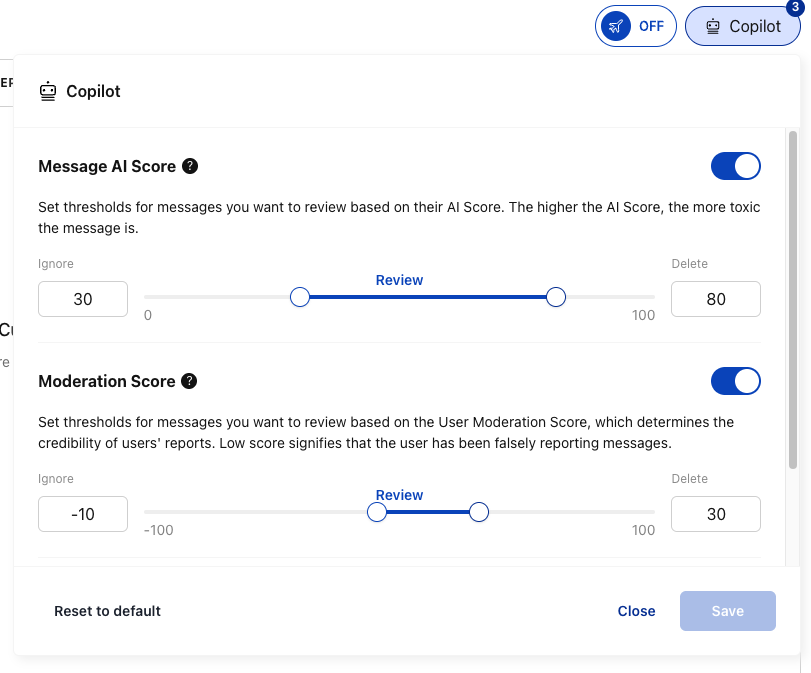
Copilot provides semi-automated moderation of messages based on the AI score, moderation score and user report thresholds.
At present, you can set three different thresholds for Copilot:
-
Message AI Score: represents the toxicity level assigned to each message by the AI. The higher the AI Score, the more toxic the message is.
-
User Moderation Score: is a score assigned to users reporting a message based on the credibility of their previous reports. Negative moderation score indicates the users have a history of falsely reporting neutral messages.
-
Number of User Reports: indicating how many times a message has been reported by other users.
Depending on the thresholds, each new reported message is either ignored, shown for review, or is automatically deleted. Thresholds can be reset to their default values. Copilot is enabled by default.
Depending on set thresholds, the reported messages either get ignored, come in for a review, or get automatically deleted.
You can reset thresholds to their default values.
#Moderation as a Service (MaaS)
When the external moderation service is enabled for the operator the messages are split into two tabs: Virtual Stadium and Moderation Service.
Copilot and autopilot settings are individual for each tab, so they must be set up separately.