---
title: "Season Top Lists"
canonical_url: "https://apidocs.sportradar.com/resources/widgets/docs/widgets/season/top-lists"
markdown_url: "https://apidocs.sportradar.com/resources/widgets/docs/widgets/season/top-lists.md"
last_updated: "2026-03-26T13:44:48Z"
---
# Season Top Lists
**Season Top Lists** widget displays statistical leaders for a season across multiple categories using a tabbed interface. The widget showcases top-performing players in goals, assists, cards (for soccer), points (for ice hockey), and injuries. It is designed for sports platforms that need to highlight statistical leaders and provide comprehensive season-level player performance data. The widget supports both soccer and ice hockey, offers flexible category selection, and includes optional contribution charts.
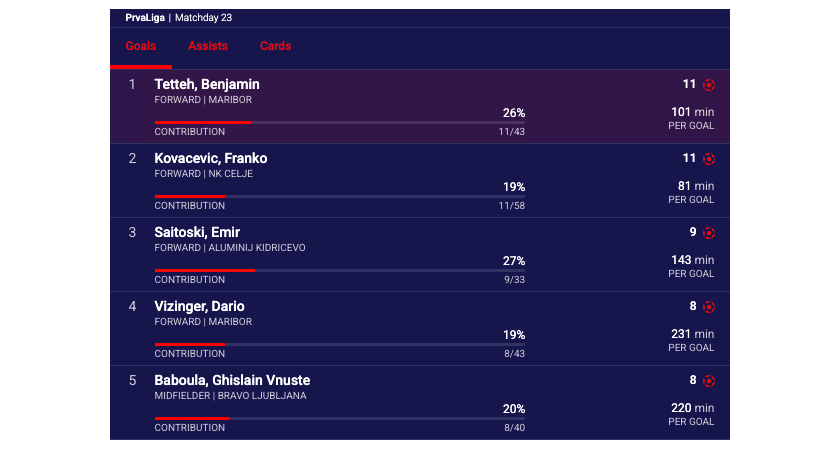
Shows the default view of the Season Top Lists widget.
See the [Season Top Lists widget demo](https://widgets.sir.sportradar.com/widgets-demo#widget:\(name:season.topLists\)).
## API Reference
### Required Parameters
- **widget-name**: `season.topLists`
The widget requires **one of four identifiers** to determine the season.
**Required identifiers (choose one):**
- **seasonId**: Direct season identifier
- **matchId**: Match ID from which season is derived
- **tournamentId**: Tournament identifier
- **uniqueTournamentId**: Unique tournament identifier
See [Getting Identifiers](https://apidocs.sportradar.com/resources/widgets/docs/tutorials/getting-identifiers.md).
**Environment Requirements**
## Technical Requirements:
- JavaScript enabled
- XMLHttpRequest support for data fetching
- CSS3 support for styling and animations
**Supported Sports**
The Season Top Lists widget supports the following sports:
- Ice Hockey & NHL
- Soccer
| Property | Type | Default | Description |
| --------------------- | --------- | ------------------------------ | --------------------------------------------------------------------------------------------------------------------------------------------------------------------------------------------------------------------------------------------------- |
| `matchId` | `number` | Conditional\* | Match identifier from which season is derived.
See [Getting Identifiers](https://apidocs.sportradar.com/resources/widgets/docs/tutorials/getting-identifiers.md) |
| `seasonId` | `number` | Conditional\* | Direct season identifier.
See [Getting Identifiers](https://apidocs.sportradar.com/resources/widgets/docs/tutorials/getting-identifiers.md) |
| `categories` | `string` | `"goals,assists,cards,points"` | Comma-separated list of categories to display as tabs. Order determines tab sequence.
|
| `activeTab` | `string` | `"id_tab_goals"` | Initially active tab. Available values:
`"id_tab_goals"`
`"id_tab_assists"`
`"id_tab_cards"`
`"id_tab_points"`
`"id_tab_injuries"`
|
| `limit` | `number` | `5` | Number of top players to display per category. |
| `disableContrChart` | `boolean` | `false` | When `true`, hides contribution charts (percentage bars) next to player statistics. |
| `disableWidgetHeader` | `boolean` | `false` | When `true`, hides the widget header displaying season name and context. |
\* **Conditional Requirement**: One of `matchId`, `seasonId`, `tournamentId`, or `uniqueTournamentId` must be provided.
## Main Configurable Features
Illustrations of main feature variants with relevant property values below.
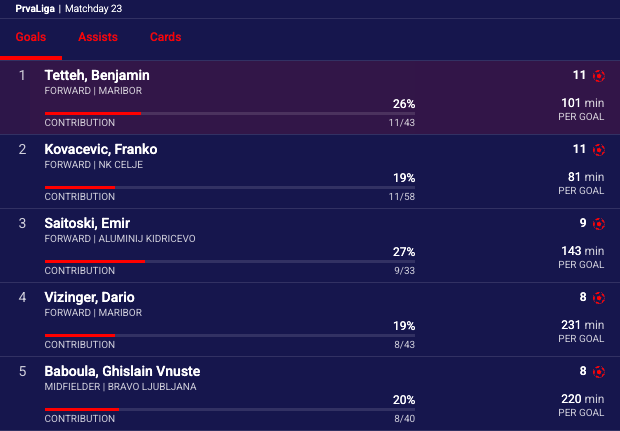
**Default View**
Shows the default view of the Season Top Lists widget.
**Sample Configuration:**
- seasonId: `string|number`
See [Season Top Lists widget demo](https://widgets.sir.sportradar.com/widgets-demo#widget:\(name:season.topLists\))
## Integration Examples
### Property Name Transformations
Properties do not always transfer from the above table directly into integration code. Properties must be transformed differently for each integration method:
#### JavaScript/Programmatic Integration
- Property names remain unchanged in camelCase
- Properties become members of the 4th parameter object in `SIR()` call
- Example: `cardVariant: "compact"`
> **Info**
>
> In javascript integration, the properties go into an object which is passed as the 4th argument of the call ti `SIR()` function. Please see [Global SIR API](https://apidocs.sportradar.com/resources/widgets/docs/tutorials/SIR.md)
#### HTML/Declarative Integration
- Convert camelCase to lowercase with dashes, e.g. cardVariant becomes card-variant
- Add `data-sr-` prefix
- Example: `cardVariant` → `data-sr-card-variant`
- Example: `filters.sport.hidden` → Complex objects must be passed as JSON strings
> **Info**
>
> In HTML integration, the properties go into the parent HTML object as object properties, prefixed with `data-sr-` as explained above.
> **Only base property support**
>
> This method supports only simple (base) properties and does not support properties that require functions.
> **Info**
>
> In all examples replace `sportradar` in the widgetloader URL path with your clientId.
>
> Example if your clientId is `client1`:
>
> - This URL: `https://widgets.sir.sportradar.com/sportradar/widgetloader`
> - becomes: `https://widgets.sir.sportradar.com/client1/widgetloader`
**Default View**
### JavaScript (Programmatic)
Initialize the widget programmatically using the JavaScript API. The widget renders in the specified container element.
```js
(function(a,b,c,d,e,f,g,h,i){a[e]||(i=a[e]=function(){(a[e].q=a[e].q||[]).push(arguments)},i.l=1*new Date,i.o=f,
g=b.createElement(c),h=b.getElementsByTagName(c)[0],g.async=1,g.src=d,g.setAttribute("n",e),h.parentNode.insertBefore(g,h)
)})(window,document,"script","https://widgets.sir.sportradar.com/sportradar/widgetloader","SIR", {
language: 'en'
});
SIR('addWidget', '#sr-widget', 'season.topLists', {
seasonId: 123
});
```
```html
```
### HTML (Declarative)
Insert the following HTML code at the target widget location. Complex object properties must be passed as JSON-encoded strings.
```html