Fixtures widget displays a comprehensive list of scheduled and completed matches for a tournament or season. It provides an organized view of fixtures with multiple navigation options including round-by-round browsing, date-based filtering, and live match toggle. The widget supports both vertical (list/grid) and horizontal carousel layouts, making it adaptable for various page contexts. With optional league selector, and interactive match clicking, this widget is ideal for season overviews, tournament schedules, match centers, and sports hub pages.
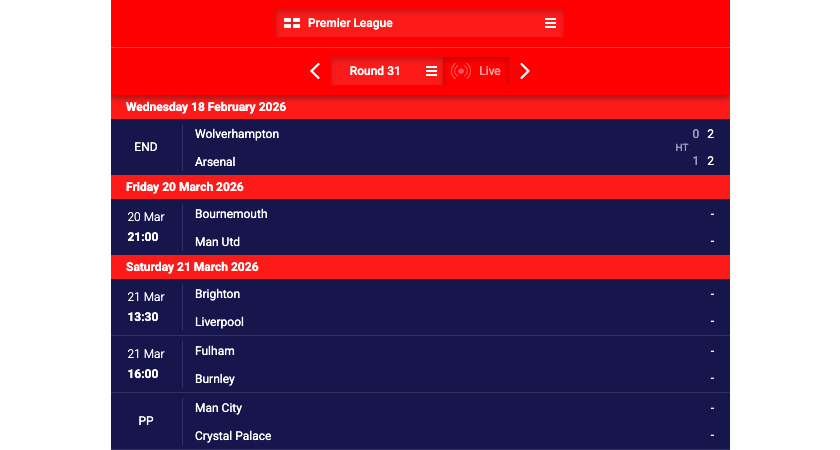
Shows the season fixtures widget in a vertical layout.
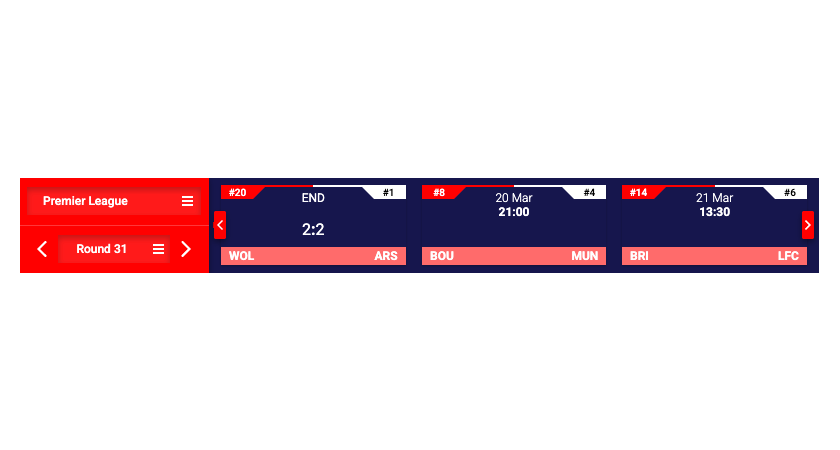
Shows the season fixtures widget in a horizontal layout.
See the Fixtures widget demo.
season.fixturesThe widget requires any of following parameters.
Required parameter (choose one):
Environment Requirements
Supported Sports
The Season Fixtures widget supports the following sports:
| Sport | Sport ID |
|---|---|
| Soccer | 1 |
| Basketball | 2 |
| Ice Hockey | 4 |
| Tennis | 5 |
| Handball | 6 |
| Rugby | 12 |
| Darts | 22 |
| Volleyball | 23 |
| Badminton | 31 |
| Beach Volley | 34 |
| Property | Type | Required | Default | Description |
|---|---|---|---|---|
sportId | number | Conditional* | null | Sport identifier. Must align with tournament/season sport. See Getting Identifiers |
matchId | number | Conditional* | null | Match identifier for auto-scrolling to specific match and highlighting. See Getting Identifiers |
seasonId | number | Conditional* | null | Season identifier. Displays fixtures for specific season. See Getting Identifiers |
tournamentId | number | Conditional* | null | Tournament identifier. Displays fixtures for the specified tournament. See Getting Identifiers |
uniqueTournamentId | number | Conditional* | null | Unique tournament identifier. Shows fixtures across seasons. See Getting Identifiers |
layout | string | No | "vertical" | Widget layout mode. Options: "vertical" (list or grid), "horizontal" (carousel). |
verticalLayoutType | string | No | "list" | Vertical layout style. Options: "list" (traditional list), "grid" (card-based grid). Only applies when layout: "vertical". |
isLive | boolean | No | false | When true, filters to show only live/in-progress matches. |
groupTournaments | boolean | No | false | When true, groups matches by tournament and displays tournament names. |
disableRoundSelector | boolean | No | false | When true, hides the round selector dropdown and navigation arrows. |
round | number | No | null | Specific round number to display. When set, widget jumps to that round. Combine with disableRoundAutoSelect: true for static display. |
favoriteTournaments | array | No | null | Array of tournament IDs to display in league selector. Enables multi-tournament switching. |
autoSelect | string|boolean | No | false | Auto-selection behavior. Options: false (disabled), "init" (initial load only), "league" (on league change), "round" (on round change). |
filterUtIds | string | No | null | Comma-separated string of unique tournament IDs to filter. Example: "17,18,19". |
onItemClick | function | No | undefined | Callback triggered when an item from the list is clicked. Emits matchId. |
hideLimitedCoverageIcon | boolean | No | false | When true, hides the limited coverage indicator icon for matches with restricted data. |
* Conditional Requirement: One of matchId, sportId, seasonId, tournamentId, or uniqueTournamentId must be provided.
Illustrations of main feature variants with relevant property values below.
Shows the season fixtures widget in a vertical layout.
Sample Configuration:
verticalProperties do not always transfer from the above table directly into integration code. Properties must be transformed differently for each integration method:
SIR() callcardVariant: "compact"In javascript integration, the properties go into an object which is passed as the 4th argument of the call ti SIR() function. Please see Global SIR API
data-sr- prefixcardVariant → data-sr-card-variantfilters.sport.hidden → Complex objects must be passed as JSON stringsIn HTML integration, the properties go into the parent HTML object as object properties, prefixed with data-sr- as explained above.
In all examples replace sportradar in the widgetloader URL path with your clientId.
Example if your clientId is client1:
https://widgets.sir.sportradar.com/sportradar/widgetloaderhttps://widgets.sir.sportradar.com/client1/widgetloaderInitialize the widget programmatically using the JavaScript API. The widget renders in the specified container element.
(function(a,b,c,d,e,f,g,h,i){a[e]||(i=a[e]=function(){(a[e].q=a[e]
This method supports only simple (base) properties and does not support properties that require functions.
<div id="sr-widget"></div>Insert the following HTML code at the target widget location. Complex object properties must be passed as JSON-encoded strings.
<div id="sr-widget"
data-sr-widget="season.fixtures"
data-sr-layout="vertical">
</div>
<script type="application/javascript"
src="https://widgets.sir.sportradar.com/sportradar/widgetloader"
async>
</script>