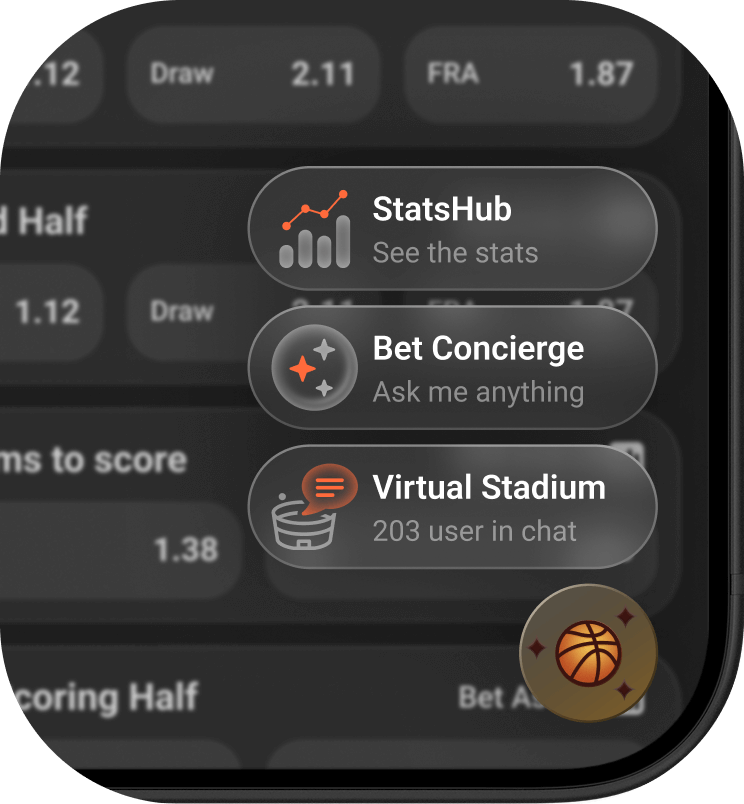
BET 3-in-1 is a lightweight floating entry point designed to streamline the integration of Sportradar's fan engagement tools by providing a single, customizable gateway to Virtual Stadium, Bet Concierge, and StatsHub.
Instead of managing multiple widget integrations, BET 3-in-1 gives your users instant access to all enabled products through one unobtrusive button — keeping your page clean while maximising engagement.
Instead of managing multiple widget integrations, BET 3-in-1 gives your users instant access to:
Social interaction meets live match visualization. Keep fans engaged with real-time chat, interactive graphics, and community features that turn passive viewers into active participants.
AI-powered betting intelligence at your users' fingertips. Deliver personalized insights, smart suggestions, and data-driven recommendations that drive betting action and user satisfaction.
Deep statistical analysis for data-hungry users. Comprehensive match statistics, historical data, and performance metrics that inform smarter betting decisions.
A floating button in a fixed position. There when needed, unobtrusive when not.
One click reveals up to three options in an animated menu.
Opens in an optimized modal on desktop or full-screen overlay on mobile.
BET 3-in-1 is fully customizable to match your brand identity.
The launcher trigger icon adapts automatically to the sport of the current match.
To initialize BET 3-in-1 (bet3in1), add the following code to your page:
<script>
    (function(a,b,c,d,e,f,g,h,i){a[e]||
Enable only the products you license — toggle individual products on/off with a simple configuration change.
bet3in1MATCH_ID — Sportradar Match ID. Passed as entityId: "sr:match:50955863" (preferred) or legacy matchId: 50955863 (still supported)JWT — String or getJwt callback promise returning a signed JSON Web Token. Required for Virtual Stadium and Bet Concierge. See JWTCHANNEL_ID — Virtual Stadium channel ID. Required when Virtual Stadium is enabledCLIENT_ALIAS — Your client alias for StatsHub URL generation. Required when StatsHub is enabledTo enable betting functionality (e.g., adding a suggested bet from Bet Concierge to the betslip or using Flash Bet in Virtual Stadium), you must register an adapter. The adapter acts as a bridge between the Sportradar widget and your sportsbook's betslip API.
Data adapter for Bet Concierge betting functionality.
Adapter for Virtual Stadium Flash Bet integration.
For Virtual Stadium and Bet Concierge to function correctly, you must pass a valid JSON Web Token (JWT) representing the authenticated user.
JWT Required Claims — See the full documentation for required claims: JWT Authentication Guide
StatsHub requires you to complete a setup document. Download the latest version from the StatsHub demo page to get started.
StatsHub Setup — Download Setup Document
BET 3-in-1 is fully customizable via CSS class selectors. See the dedicated page for the full reference including all classes, customization options, and code examples.
Full CSS class reference for trigger button, product buttons, overlay, and per-sport styling.
Learn how to obtain entity IDs (sr:match:{id}) required for widget configuration.
Set up JSON Web Token authentication for Virtual Stadium and Bet Concierge.
Implement analytics and monitoring for widget interactions and performance.
| Name | Type | Attributes | Default | Description |
|---|---|---|---|---|
entityId | string | required | Sportradar entity identifier in sr:match:{id} format. Example: "sr:match:50955863" | |
matchId | string | deprecated | Still supported. Plain numeric Sportradar Match ID. Prefer entityId for new integrations | |
products | object | required | Products configuration object | |
products.virtualStadium | object | Virtual Stadium configuration | ||
products.virtualStadium.label | string | Custom label (default: 'Virtual Stadium') | ||
products.virtualStadium.icon | string | Custom icon URL | ||
products.virtualStadium.order | number | Display order (1-3) | ||
products.virtualStadium.channelId | string | VS channel ID (required if enabled) | ||
products.virtualStadium.jwt | string | JWT token for authentication | ||
products.betConcierge | object | Bet Concierge configuration | ||
products.betConcierge.label | string | Custom label (default: 'Bet Concierge') | ||
products.betConcierge.description | string | Custom description (default: 'AI Insights') | ||
products.betConcierge.icon | string | Custom icon URL | ||
products.betConcierge.order | number | Display order (1-3) | ||
products.betConcierge.getJwt | function | Function to get JWT token | ||
products.betConcierge.useLegacy | boolean | true | Selects which Bet Concierge widget to mount. true (default) mounts the legacy betConcierge widget; false mounts betConciergeNew | |
products.statsHub | object | StatsHub configuration | ||
products.statsHub.label | string | Custom label (default: 'StatsHub') | ||
products.statsHub.description | string | Custom description (default: 'Deep Stats') | ||
products.statsHub.icon | string | Custom icon URL | ||
products.statsHub.order | number | Display order (1-3) | ||
products.statsHub.clientAlias | string | Client alias (used to auto-generate URL) | ||
launcherTriggerImage | string | Custom primary button icon URL (SVG/PNG, 1:1 ratio, transparent bg) | ||
sportIcons | object | Map of sport IDs to custom icon URLs. Overrides default sport icons on the trigger button. Example: { '1': 'https://example.com/soccer.svg', '2': 'https://example.com/basketball.svg' } | ||
position | string | 'bottom-right' | Position: 'bottom-right', 'bottom-left' |