---
title: "Self-Service Adapter"
canonical_url: "https://apidocs.sportradar.com/resources/widgets/docs/adapter/SelfServiceImplementation"
markdown_url: "https://apidocs.sportradar.com/resources/widgets/docs/adapter/SelfServiceImplementation.md"
last_updated: "2026-09-14T11:23:06Z"
---
# Self-Service Adapter
## What Is a Self-Service Adapter?
A Self-Service Adapter is a custom integration layer that connects SIR Widgets to your betting data sources. Instead of using Sportradar's hosted adapter, you implement the data fetching logic yourself, giving you complete control over:
- **Data Sources** – Connect to any odds/betting API
- **Data Transformation** – Map your API responses to the widget-expected format
- **Caching Strategy** – Implement your own caching and optimization
- **Real-Time Updates** – Control how and when data refreshes
## Understand the Adapter Structure
The adapter object consists of two primary properties:
- **`config`**: Contains static configuration for widgets, such as layout options and filtering rules.
- **`endpoints`**: A collection of functions that the widget calls to request data (e.g., event details, markets, odds).
```javascript
const adapter = {
config: {
widget: {
'betRecommendation.eventList': {
layout: { /* EventListMarketsConfig */ },
allowedMarkets: { /* SportMarketsMap */ }
},
// ... other widgets
}
},
endpoints: {
event: (args, callback) => {
// Fetch and return event data
// Return optional unsubscribe function
},
eventMarkets: (args, callback) => {
// Fetch and return markets for event
},
market: (args, callback) => {
// Fetch and return specific market
}
// ... other endpoints
}
};
```
1. **Step 1**
#### Config Object
The `config` object currently allows you to pass static configuration to widgets. This is optional but useful for setting up widget-specific behaviors like market filtering or layout options.
2. **Step 2**
#### Widget Configuration
Under `config.widget`, you can define settings for specific widgets. The keys here must match the widget names (e.g., `betRecommendation.eventList`).
3. **Step 3**
#### Specific Widget Settings
Here is an example configuration for the `betRecommendation.eventList` widget, defining its layout and allowed markets.
4. **Step 4**
#### Endpoints Definitions
The `endpoints` object is the most important part. It defines the mapping between widget data requests and your API. Every data requirement from a widget triggers a call to one of these methods.
5. **Step 5**
#### Endpoint Implementation
Each endpoint function receives `args` containing the request context (like event ID or language) and a `callback` to return data or errors.
## Understand the Adapter Data Flow
The following diagram illustrates how data flows from your backend API through the adapter and into the widget.
```mermaid
sequenceDiagram
participant Widget
participant Adapter
participant UserAPI as Your Backend API
Widget->>Adapter: 1. Request Data (e.g. eventMarkets)
Adapter->>UserAPI: 2. Fetch or Subscribe to Data (HTTP/WebSocket)
UserAPI-->>Adapter: 3. Return Raw Data (JSON)
Adapter->>Adapter: 4. Transform to SIR Format
Adapter-->>Widget: 5. Return Data via Callback
Adapter-->>Widget: 6. On new data return it via Callback
```
The adapter acts as a bridge, ensuring that whatever format your API returns is converted into the structure the widget expects.
### Workflow Breakdown

The widget starts by asking the adapter which markets are available for each event using the `availableMarketsForEvent` endpoint.
**Example:** The widget requests available markets for Event A, Event B, and Event C.

The adapter responds to each request with the available markets for that event.
**Example:** For Event A, the adapter returns "1x2" and "Spread" markets. For Event B, only "1x2" is available. For Event C, no data is returned (e.g., event expired). The widget displays placeholders while it loads detailed data.

**Data Retrieval Phase:**
The widget now requests all the data it needs in parallel. It calls the `market` endpoint for odds and outcomes, the `event` endpoint for event details (like team names and scores), and the `betSlipSelection` endpoint to check the user's current selections.
**Example:** For Event A, the widget requests both "1x2" and "Spread" markets. For Event B, it requests "1x2". It also fetches event details for both events and checks the user's bet slip selections.
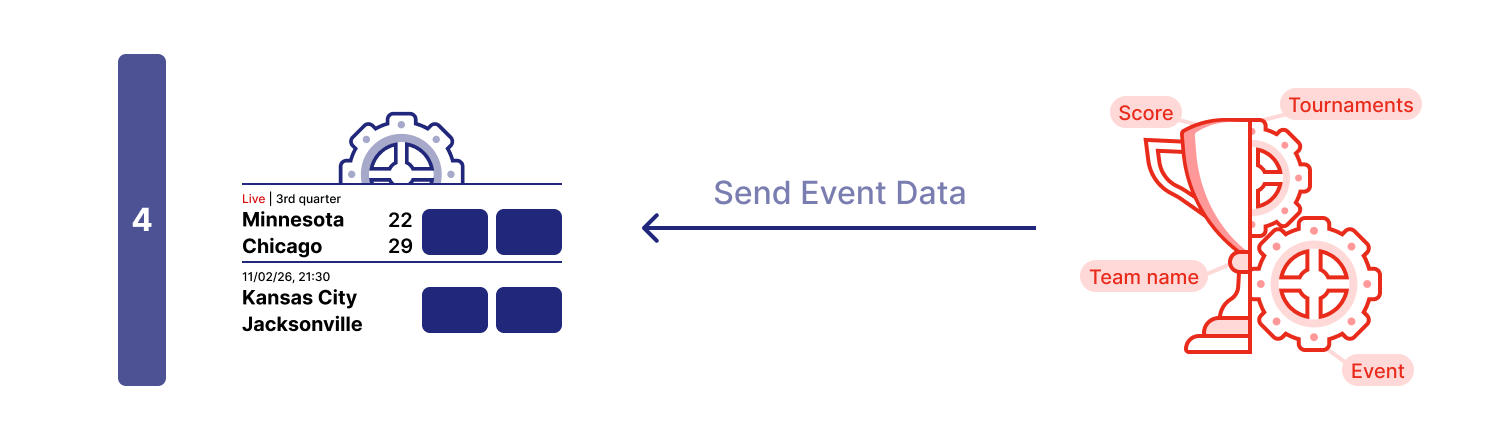
When the widget receives data from the `event` endpoint, it fills in the placeholders with event information.
**Example:** Team names, scores, match period, and start time are displayed.
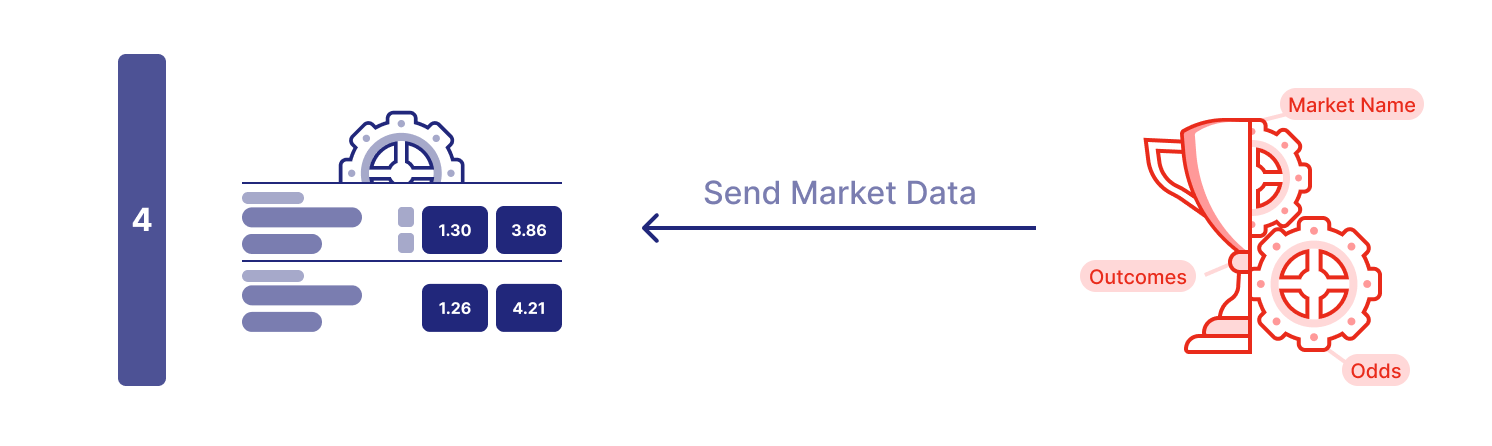
When the widget receives data from the `market` endpoint, it fills in the odds and outcomes for each market.
**Example:** The widget displays the latest odds for each outcome.
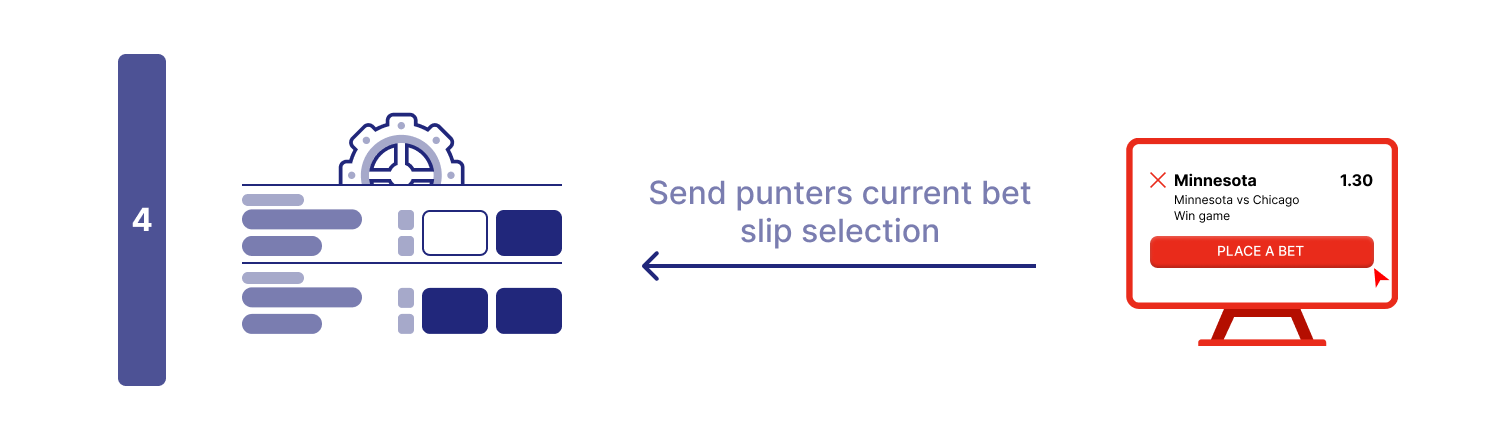
When the widget receives data from the `betSlipSelection` endpoint, it updates the UI to reflect the user's current selections.
**Example:** If the user has already selected outcome 1 for the "1x2" market in Event A, the widget marks it as selected.

Once all endpoint requests have returned data (or timed out), the widget displays the complete information to the user.
> **Note**
>
> The sequence above is a general example. Each widget has its own unique data pattern, which is detailed in its specific documentation.
### Base Implementation Example
Start with this basic HTML structure to implement your self-service adapter.
```html
Self-Service Adapter Demo
```
1. **Step 1**
#### Basic Structure
Base structure needed for a standalone HTML file.
2. **Step 2**
#### Styling
If you are working from starting standalone HTML file add CSS styles for the widget container.
When integrating into an existing website, style the widget container according to your page design instead of using these example styles.
3. **Step 3**
#### Widget Loader Script
Add the SIR widget loader script in the `` section. This loads the widget framework asynchronously and makes the global `SIR` function available.
Make sure to replace:
- `` with your actual Sportradar client ID.
4. **Step 4**
### Adapter Implementation
Here goes your adapter implementation code. Example using mocked data is in [Self-Service Implementation - Mocked Data Example](https://apidocs.sportradar.com/resources/widgets/docs/adapter/SelfServiceImplementation.md#mocked-data-adapter-example).
5. **Step 5**
### Register Adapter
Register the adapter object using `SIR("registerAdapter", adapter)`. This must be done **once** before adding any widgets.
6. **Step 6**
#### Add Widget
Initialize the widget using `SIR("addWidget", ...)` inside a `load` event listener. This ensures the widget is added after the page and framework are valid.
Make sure to replace:
- `` with the actual widget name (e.g. `betInsights`)
- `...widgetProps` with the specific properties for that widget (e.g., `{ matchId: 12345678 }`)
7. **Step 7**
#### Widget Container
Create a container element (`#sr-widget`) where the widget will be rendered. Widgets need a target element to mount into.
## Adapter Implementation
The adapter is a JavaScript object that serves as the interface between your application's data layer and the SIR Widgets. It defines how widgets request data and how your application provides it.
### Implementing the Adapter Endpoints
Before implementing endpoints, review the endpoint type definitions in [Types](https://apidocs.sportradar.com/resources/widgets/docs/adapter/Types.md) so you understand the required shapes, fields, and callback contracts.
Now implement the complete adapter with all core endpoints. Here's the full adapter implementation with mock data:
```html
Self-Service Adapter Demo
```
1. **Step 1**
#### AvailableMarketsForEvent Endpoint
Called when a widget needs to get a list of all currently available markets for an event. Returns a [selection[]](https://apidocs.sportradar.com/resources/widgets/docs/adapter/Types.md#selection) where each item is a market identifier object. Use `type: "uf"` when your data follows Sportradar's UOF format, or `type: "external"` when using your own custom data format.
2. **Step 2**
#### EventMarkets Endpoint
Called to fetch all betting markets and odds for a specific event. Receives [selection, language, and oddsType](https://apidocs.sportradar.com/resources/widgets/docs/adapter/Types.md#eventmarketsrequest) args. Returns an array of markets, each containing outcomes with current odds and status.
3. **Step 3**
#### Event Endpoint
Called to fetch basic event information for display in widget headers and metadata. Receives [selection](https://apidocs.sportradar.com/resources/widgets/docs/adapter/Types.md#eventrequest) args. Returns event details including teams, date, sport, category, and tournament information.
4. **Step 4**
#### FilterMarkets Endpoint
Called to filter down available markets for widget-specific requirements. Receives [widget and eventsSelection](https://apidocs.sportradar.com/resources/widgets/docs/adapter/Types.md#filtermarketsrequest) args. This acts as a filter to exclude markets. For example: two widgets for the same event share a single [`availableMarketsForEvent`](https://apidocs.sportradar.com/resources/widgets/docs/adapter/Types.md#availablemarketsforevent-function) call to fetch all markets, then each widget calls [`filterMarkets`](https://apidocs.sportradar.com/resources/widgets/docs/adapter/Types.md#filtermarkets-function) to return only those markets you want to display in that widget.
5. **Step 5**
#### BetSlipSelection Endpoint
Called once at initialization to subscribe to the bettor's bet slip selections. Takes no args. Save the callback function and invoke it whenever the bet slip changes to keep widgets synchronized with the user's current selections. See [`BetSlipSelectionFunction`](https://apidocs.sportradar.com/resources/widgets/docs/adapter/Types.md#betslipselection-function) for details.
6. **Step 6**
#### CashBackSelections Endpoint
Called to retrieve events eligible for cashback offers. Takes no args. See [`CashBackSelectionsFunction`](https://apidocs.sportradar.com/resources/widgets/docs/adapter/Types.md#cashbackselections-function) for details.
7. **Step 7**
#### Tickets Endpoint
Called to retrieve the bettor's placed bets (tickets) for bet-sharing flows in **Virtual Stadium** (chat bet-share picker) and **Central Hub** (share-betslip list). The widget stack invokes your `tickets(args, callback)` once when the bet-share picker opens; **your code** calls `callback(undefined, data)` to deliver the response (and may call it again for pagination only). The widget never calls `callback`. Return an unsubscribe function to cancel any in-flight fetch when the picker closes.
Receives [`TicketsRequest`](https://apidocs.sportradar.com/resources/widgets/docs/adapter/Types.md#ticketsrequest) args (`endCustomerId`, optional `events` / `channelId`). Returns [`TicketResponseV2`](https://apidocs.sportradar.com/resources/widgets/docs/adapter/Types.md#ticketresponsev2).
Choose one of two implementation methods — see [Two ways to implement the tickets endpoint](https://apidocs.sportradar.com/resources/widgets/docs/adapter/Types.md#tickets-function):
- **Option A (non-paginated):** return the full `tickets` array in a single callback (tested and recommended).
- **Option B (paginated):** return the first page with `pageSize` / `hasMore` / `nextCursor`; call the stored `callback` with `newTickets` after `onAction` `ticketsFetchMore`.
Step-by-step examples: [Adapter Tickets Endpoint Example](https://apidocs.sportradar.com/resources/widgets/docs/tutorials/examples/adapter-tickets-endpoint-example.md) (Track A / Track B). See also [`Ticket`](https://apidocs.sportradar.com/resources/widgets/docs/adapter/Types.md#ticket) for the v2 schema.
### Example: Mocked Data Adapter
Here's the complete HTML file with all pieces assembled:
**Code Block**
```html
Self-Service Adapter Demo
```
### Connect to Your API
To connect to your actual betting API, you need to replace the mock data with actual network requests. This typically involves fetching data from your backend and transforming it to match the structure expected by the widget.
```javascript
event: (args, callback) => {
const eventId = args.selection.event;
fetch(`https://your-api.com/events/${eventId}`)
.then(response => {
if (!response.ok) throw new Error(`HTTP ${response.status}`);
return response.json();
})
.then(apiData => {
// Transform your API response to match the expected format
const eventData = {
event: {
id: apiData.id,
date: {
displayValue: formatDate(apiData.startTime),
startTime: apiData.startTime
},
sport: { id: apiData.sportId, name: apiData.sportName },
category: { id: apiData.categoryId, name: apiData.categoryName },
tournament: { id: apiData.tournamentId, name: apiData.tournamentName },
teams: apiData.competitors.map(c => ({ id: c.id, name: c.name })),
isLive: apiData.status === "live"
}
};
callback(undefined, eventData);
})
.catch(error => {
callback(error);
});
return () => {
// Cancel pending request if needed
};
}
```
1. **Step 1**
#### Get Request Parameters
Extract the necessary parameters from the `args` object. For an `event` endpoint, you'll typically need the `eventId`.
2. **Step 2**
#### Fetch Data
Perform an asynchronous request (e.g., using `fetch`) to your API endpoint. Ensure you handle HTTP errors appropriately.
3. **Step 3**
#### Transform Data
**This is the most critical step.** Your API response likely has a different structure than what the widget expects. You must map your data fields to the specific format required by the SIR Adapter interface.
4. **Step 4**
#### Return Data via Callback
Once the data is transformed, invoke the `callback` function with `undefined` as the first argument (no error) and your transformed data object as the second argument.
5. **Step 5**
#### Handle Errors
If the fetch fails or transformation errors occur, call the `callback` with the error object as the first argument. This allows the widget to display an error state or retry.
### Adding Real-Time Updates
For live events, it is crucial to keep odds and market status up to date. You can achieve this using polling or WebSockets. Here is an example using polling:
```javascript
eventMarkets: (args, callback) => {
const eventId = args.selection.event;
let intervalId;
const fetchMarkets = () => {
fetch(`https://your-api.com/events/${eventId}/markets`)
.then(res => res.json())
.then(data => {
callback(undefined, transformMarketsData(data));
})
.catch(err => callback(err));
};
// Initial fetch
fetchMarkets();
// Poll every 3 seconds for live updates
intervalId = setInterval(fetchMarkets, 3000);
// Return cleanup function
return () => {
clearInterval(intervalId);
};
}
```
1. **Step 1**
#### Setup & Initialization
First, extract the necessary parameters (like `eventId`) from the arguments. We also declare a variable to hold our interval ID so we can clear it later.
2. **Step 2**
#### Data Fetching
Define a function to fetch the latest data from your API. When data returns, transform it and call the `callback` with the new data. This ensures the widget always displays the most recent information.
3. **Step 3**
#### Polling Mechanism
Call the fetch function immediately to get initial data, then set up an interval to call it repeatedly (e.g., every 3 seconds). This creates a simple polling mechanism for real-time updates.
4. **Step 4**
#### Cleanup (Unsubscribe)
**Crucial:** Return a cleanup function. The widget calls this function when it unmounts or when the event selection changes. You must clear intervals or close WebSocket connections here to prevent memory leaks and unnecessary network traffic.
## Further Reading
- [Adapter API Reference](https://apidocs.sportradar.com/resources/widgets/docs/adapter/Types.md) – Complete type definitions for all endpoints
- [Adapter Overview](https://apidocs.sportradar.com/resources/widgets/docs/adapter/Overview.md) – Architecture and concepts
- [Self-Service Adapter Reference](https://apidocs.sportradar.com/resources/widgets/docs/adapter/SelfServiceImplementation.md) – Detailed endpoint documentation
- [Hosted Adapter](https://apidocs.sportradar.com/resources/widgets/docs/adapter/HostedImplementation.md) – Alternative approach using Sportradar-managed adapter
## Widget-Specific Tutorials
Once you've completed this general integration tutorial, refer to widget-specific guides for detailed implementation patterns:
- Bet Insights Widget – *Coming soon*
- Bet Recommendation Widgets – *Coming soon*
- Swipe Bet Widget – *Coming soon*